JANCTION Render's HTTP API is five calls: POST /v1/keys for a temporary key, POST /v1/files to upload the scene, POST /v1/jobs to render (kind info | preview | final), GET /v1/jobs/{id} for status and ETA, GET /v1/jobs/{id}/artifacts/{name} for the files. JSON in, JSON out, no sign-up. Each new key starts with a welcome credit of up to 500 JPY (100 JPY with no card, 400 JPY more after registering a card, which is not charged) (14 days); after that, previews stay free up to 2 GPU-minutes a day and finals cost 0.1 JPY per GPU-second. AI agents connect at https://render.janction.jp/mcp (remote MCP with OAuth; connecting creates a free key).
Updated 2026-11-12
What it does Your own .blend, bpy script or 3D file (glTF/GLB, FBX, USD, OBJ...) rendered to images or video on a cloud NVIDIA GPU, from an AI app, the terminal or the browser. The first preview needs no payment. What it does not do It does not speed up the Blender viewport on your machine, does not take non-Blender video, simulations or general GPU jobs, and an AI that is not connected cannot render on its own.
Browser only; no connector or CLI needed. A 100 JPY welcome credit for a new key (14 days, no card; one per network every 30 days, further keys on the same network share what is left), and 400 JPY more for saving a card that is not charged (once per card); after that, previews stay free up to 2 GPU-minutes a day and finals cost 0.1 JPY per GPU-second.
For pipelines and your own agents
Everything the MCP tools do is plain HTTP with JSON. A temporary key needs no sign-up.
Embed it in your app (product shots for every upload)
For an app whose users upload 3D models (an AI 3D generator, a marketplace, a shop builder), the service is a rendering backend: one key for the app, a fixed-price outcome per upload, a webhook when it is done. Complete example, FastAPI and httpx:
# pip install fastapi httpx uvicorn
import hashlib, os, httpx
from fastapi import FastAPI, Request, UploadFile

JR = "https://render.janction.jp"
KEY = os.environ["JANCTION_RENDER_API_KEY"]     # one key for your app: POST /v1/keys creates it, GET /v1/me shows the credit
H = {"X-API-Key": KEY}
app = FastAPI()
orders: dict[str, dict] = {}                      # your database in real life

@app.post("/products/{sku}/shots")               # your user uploads a GLB; you order 4 product shots
async def order_shots(sku: str, file: UploadFile, request: Request):
    data = await file.read()
    async with httpx.AsyncClient(timeout=120) as jr:
        up = await jr.post(f"{JR}/v1/files", headers=H, files={"file": (file.filename, data)})
        up.raise_for_status()                      # 100 MB per upload; a larger model goes in as a link (scene_url)
        r = await jr.post(f"{JR}/v1/outcomes/product-shot",
                          headers={**H, "Idempotency-Key": f"shots-{sku}-{hashlib.sha256(data).hexdigest()[:16]}"},
                          json={"scene_id": up.json()["scene_id"], "size": "square", "transparent": True,
                                "notify_url": str(request.url_for("jr_done"))})
    if r.status_code == 402:                       # credit is short: send the user to r.json()["checkout_url"], then retry
        return {"error": "credit", "pay_at": r.json().get("checkout_url")}
    r.raise_for_status()
    j = r.json()                                   # j["outcome"]["price_yen"] is the ceiling; you pay the GPU seconds used
    orders[j["job_id"]] = {"sku": sku, "status": j["status"], "ceiling_yen": j["outcome"]["price_yen"]}
    return {"job_id": j["job_id"], "ceiling_yen": j["outcome"]["price_yen"]}

@app.post("/jr/done", name="jr_done")             # JANCTION Render POSTs here once, when the job is done or failed
async def jr_done(request: Request):
    body = await request.json()                    # {"event": "job.done" | "job.failed", "job_id": ..., "artifacts": [...]}
    async with httpx.AsyncClient(timeout=30) as jr:
        j = (await jr.get(f"{JR}/v1/jobs/{body['job_id']}", headers=H)).json()   # read it back with your key; do not trust the body
    if j["status"] == "done":                      # view_url links last 24 hours: copy the images to your own storage
        orders[j["job_id"]].update(status="done", images=[a["view_url"] for a in j["artifacts"] if a["name"].endswith(".png")])
    else:
        orders[j["job_id"]].update(status="failed", why=(j.get("failure") or {}).get("reason"))
    return {"ok": True}
What the example relies on: POST /v1/outcomes/product-shot (4 PNGs at 0/90/180/270 degrees, plain backdrop; turntable gives a 360-degree MP4) returns the price ceiling before anything runs and charges only the GPU seconds used; Idempotency-Key makes a retried request return the first job instead of a second render; notify_url (https) gets one POST with job.done or job.failed, signed with X-JR-Timestamp and X-JR-Signature (v1=hex(HMAC-SHA256(secret, "<timestamp>.<body>")), the secret is webhook.secret in GET /v1/me), and the handler reads the job back with the key instead of trusting the body; view_url links expire after 24 hours, so copy the files. Many models at once: POST /v1/batches takes up to 100 items with one notify_url. Set a cap per job and per day with POST /v1/me/limits; a 402 carries checkout_url for a top-up and auto top-up (POST /v1/billing/autocharge) keeps a busy app from stopping. Prices: /pricing; what each outcome costs: /products.
Endpoints
POST /v1/keys, POST /v1/files, POST /v1/files/{id}/assets, GET /v1/files/lookup?sha256= (reuse an upload),
POST /v1/estimate, POST /v1/jobs (kind info | preview | final; options width, height, samples, camera, fps, output,
environment, environment_strength, environment_visible, blender), GET /v1/jobs/{id}, DELETE /v1/jobs/{id},
GET /v1/jobs/{id}/artifacts/{name}, GET /v1/me, GET /v1/health (workers, queue, supported inputs and presets).
Errors: 402 payment_required (the job goes past the free GPU time left, which is the welcome credit while it lasts and then up to 2 preview GPU-minutes a day, and the credit is short; carries checkout_url), 400 beta_limit (job too big; split it), 429 rate_limited (slow down; retry_after_s).
Turntable.orbit=true makes a camera circle the scene once (default 24 frames): a preview shows four angles, a final render gives the whole turn as an MP4. Handy for an imported model.
A 48-frame turntable (960x540, 24 samples, studio preset) made with render_final(orbit=true) from a bpy script: 76 GPU seconds on JANCTION Render, 2026-10-01.
Inputs: a .blend (send external images along, or pack them: File → External Data → Pack Resources), a bpy Python script
(no local Blender needed; set the scene, camera and frame range only, the service sets engine, resolution and samples), or a
3D file (glTF/GLB, FBX, USD, OBJ, STL, PLY, Alembic, imported into an empty scene). A scene without a camera or light gets an automatic
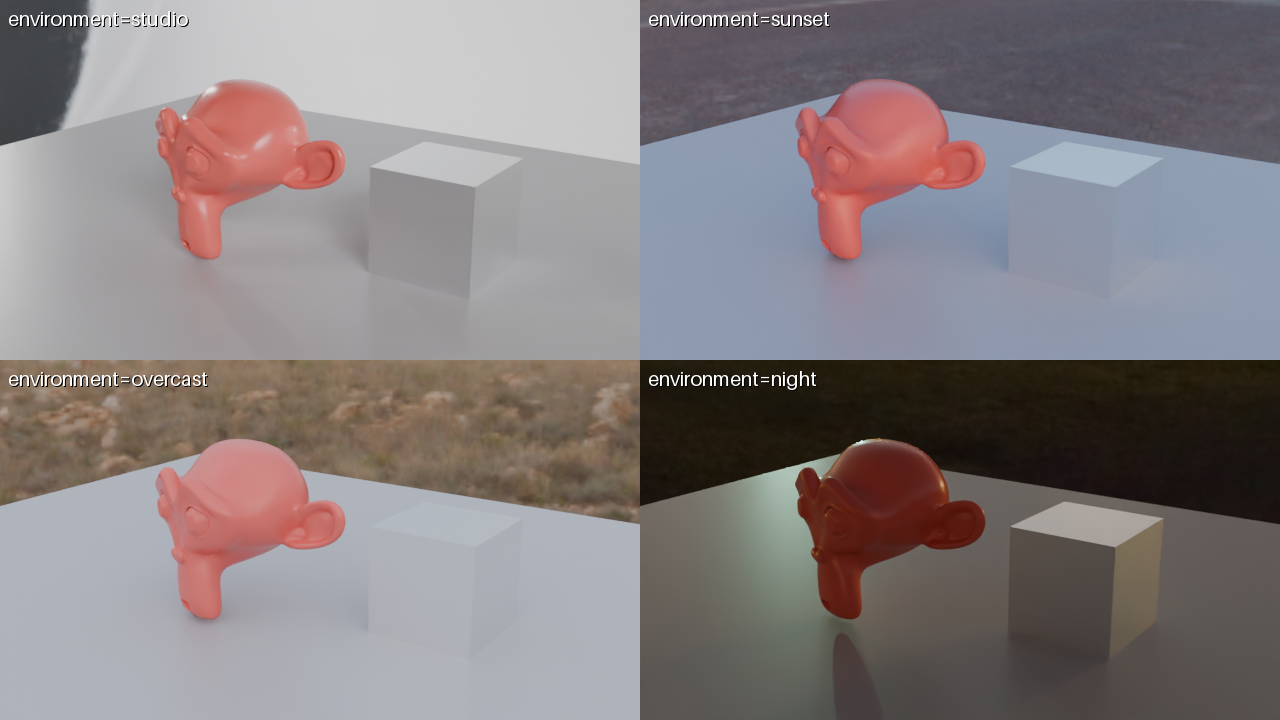
one and the response says so under warnings. environment = studio / sunset / overcast / night lights the scene with a bundled HDRI; a preview with environment="compare" shows the same frame under all four presets in one labeled image.
The same scene under the four presets. No lighting work in the script: pick one and the first render already looks finished (rendered by JANCTION Render, 2026-10-01).
Security
Each job runs in an isolated, disposable environment with no network access and limits on CPU, memory and time. Keys are stored hashed and accepted only in headers.
Details on the Security page.
Python package
pip install janction-render
janction-render preview scene.blend --frames 1-24     # the CLI uses the same API
janction-render render scene.blend --frames 1-240 --wait
Pricing (since 2026-10-08): Each new key gets 100 JPY of GPU time free with no card (1,000 GPU-seconds, 14 days) for previews and finals, and 400 JPY more once a card is saved on a Stripe page that charges nothing (once per card): up to 500 JPY in all. After it is used up or expires, previews are free up to 2 GPU-minutes per key per day and final renders are paid from prepaid credit at 0.1 JPY per GPU-second. Top-ups (paid) start at 100 JPY. The first top-up during the 14-day welcome period counts 1.5x, with the bonus capped at 500 JPY (100 JPY buys 150 JPY of credit). Top-ups of 2,000 JPY or more get 10 to 20% extra (not combined with the first-top-up bonus; the larger one applies). Top-up bonuses are separate from the welcome credit and the card-saving credit. Payment is on a Stripe Checkout page. One full welcome credit per network every 30 days; further keys from the same network use what is left of that network's credit. A job without enough credit gets HTTP 402 payment_required with a checkout_url. Final renders go up to 3,000 frames per instruction (automatically split internally under one job id), 1080p (1920x1080) on free time and up to 4K (3840x2160) on prepaid credit. The free preview time resets at 00:00 UTC (09:00 JST). No sign-up: connecting creates a key. Inputs and results are deleted 24 hours after last use (normally 7 days for keys that have paid 500 JPY or more in total) and never used for training.
FAQ
Is there a Python API to upload a .blend file and render it?
Yes. POST the .blend to /v1/files, request /v1/estimate, then POST /v1/jobs and poll the returned job_id. The Python package wraps the same calls; OpenAPI documents every request and response.
Can CI run headless Blender on a cloud GPU?
Yes. Keep the API key in the CI secret store, upload a .blend or bpy script, estimate first, and submit the final with an Idempotency-Key and max_yen. The runner needs no Blender or GPU; JANCTION returns PNG frames or an MP4.
Is there an OpenAPI document?
Yes: https://render.janction.jp/openapi.json (OpenAPI 3.1, every public endpoint with its fields and errors). llms.txt lists the same calls in prose, and the Python package (janction-render) wraps them.
How do I get the MP4 without downloading every frame?
Fetch only artifacts/output.mp4; the job view lists artifacts by name. In the MCP tools, render_download(only='mp4').
Can I reuse an uploaded scene?
Yes: keep the scene_id, or call GET /v1/files/lookup?sha256=... and the server returns the existing scene instead of taking a new upload.