SUNDAY, NOVEMBER 15, 2026

Render · Blender on RTX PRO 6000 · Tokyo
Measured on JANCTION Render with one NVIDIA RTX PRO 6000 Blackwell Max-Q Workstation Edition (96 GB): a 24-frame 720p MP4 at 64 samples takes about 59 GPU seconds, 48 frames at 1080p/128 samples about 322 s, and a 4-frame preview about 4 s. The price column uses 0.1 JPY per GPU second; a welcome credit of up to 500 JPY for a new key (100 JPY with no card, 400 JPY more after saving a card that is not charged)
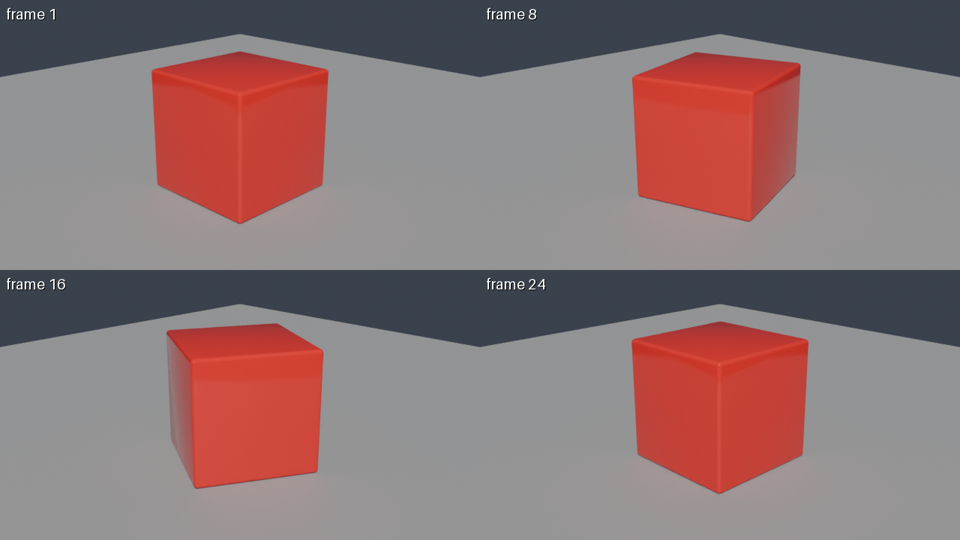
These are individual production measurements (2026-09-30 to 2026-10-01 UTC), not averages, medians or speed guarantees. The 4-GPU-second preview used a rotating cube, four 640x360 tiles, 16 samples and scene lights on the GPU named above; its measured round trip was about 8 seconds.
GPU seconds measure worker run time including Blender startup and scene loading, not GPU-chip utilization alone. Round trip runs from submission to receiving the result, with no queue wait in these measurements. Whether input upload is included depends on the measurement path; do not treat every case as upload-inclusive or infer unmeasured transfer and queue time from GPU seconds.
Complex geometry, volumes and large textures can change the result; simple scaling with samples or resolution is not guaranteed. See the machine-readable measurements (CSV, one row per measurement) and the downloadable scene files in the matrix below. Those files reproduce the matrix scenes, not the historical Claude.ai example.
The same scene with only the settings changed (2026-10-01, Cycles, denoising on, PNG frames). Scenes: cube_scene = glass sphere, cube, torus and a monkey on a floor, 24-frame orbit (samples/cube_scene.py), polyhaven_room = Poly Haven table on a textured floor under an HDRI (samples/polyhaven_room.py, assets by name). Download the files (cube_scene.py · polyhaven_room.py) and run the same settings on your own GPU or another service to compare. Command: janction-render render cube_scene.py --frames 1-24 --size 1280x720 --samples 64 --output png --wait
What the table says: on scenes this simple the sample count hardly matters (32 to 128 samples adds about 10%); the time is dominated by fixed work per frame (scene build, denoising, writing the file): about 2.4 s per 720p frame and 5.2 s per 1080p frame, and 100 frames cost about 4 times 24 frames. These observations apply to these scenes; sample count may have a larger effect elsewhere. Check an estimate and a small preview for your own scene.
| scene | resolution | samples | frames | GPU s | per frame | round trip | est. price |
|---|---|---|---|---|---|---|---|
| cube_scene | 1280x720 | 32 | 24 | 56.5 | 2.35 s | 60.7 s | 5.7 JPY |
| cube_scene | 1280x720 | 64 | 24 | 59 | 2.46 s | 69.6 s | 5.9 JPY |
| cube_scene | 1280x720 | 128 | 24 | 63.05 | 2.63 s | 66.6 s | 6.3 JPY |
| cube_scene | 1920x1080 | 64 | 24 | 122.51 | 5.10 s | 124.3 s | 12.3 JPY |
| cube_scene | 1920x1080 | 128 | 24 | 129.36 | 5.39 s | 132.5 s | 12.9 JPY |
| polyhaven_room | 1280x720 | 32 | 24 | 59.2 | 2.47 s | 60.6 s | 5.9 JPY |
| polyhaven_room | 1280x720 | 64 | 24 | 62.2 | 2.59 s | 66.6 s | 6.2 JPY |
| polyhaven_room | 1280x720 | 128 | 24 | 67.25 | 2.80 s | 69.7 s | 6.7 JPY |
| polyhaven_room | 1920x1080 | 64 | 24 | 125.51 | 5.23 s | 128.6 s | 12.6 JPY |
| polyhaven_room | 1920x1080 | 128 | 24 | 136.81 | 5.70 s | 140.4 s | 13.7 JPY |
| cube_scene | 1280x720 | 64 | 100 | 245.39 | 2.45 s | 247.3 s | 24.5 JPY |
Two demo scenes distributed by Blender, rendered on the production service on 2026-10-08. Download the same zip (sha256 below), render it with the same settings on your own GPU or on another service, and compare seconds and price per frame directly. The numbers come from scripts/bench_same_scene.py (MIT).
| scene (author, license) | GPU s per frame | price per frame | 3 frames, round trip | preview GPU s | new key to first image |
|---|---|---|---|---|---|
| Classroom (Christophe Seux, CC0) | 8.93 | 0.89 JPY | 28.4 s | 4.21 | 10.2 s |
| Barcelona Pavilion (eMirage, CC-BY) | 10.55 | 1.05 JPY | 34.5 s | 4.26 | 7.4 s |
classroom.zip: sha256 0f0ecc58d45f12b2f4272a53e2d8e69135518e16e956b118f10c20d8dcfdf5e6pabellon_barcelona_v1.scene_.zip: sha256 0a85bf512329f1780563069512b934d679a6c543eeb1a4ec4f60cddeab706697| scene | laptop, s per frame | this service, GPU s per frame | speed-up | price per frame here |
|---|---|---|---|---|
| Classroom | 14.0 | 8.9 | 1.6x | 0.89 JPY |
| Barcelona Pavilion | 13.9 | 10.6 | 1.3x | 1.05 JPY |
Laptop: NVIDIA GeForce RTX 5070 Ti Laptop GPU (12 GB), Blender 5.2.0 LTS, Cycles (OptiX), the same zip (sha256 match) and settings, measured 2026-10-20. Mean of 3 frames rendered in one open Blender; Blender start-up and scene loading are not included (the service's GPU seconds include start-up). A gaming laptop renders these in about 14 s a frame, so a few stills are fine locally. The service pays off for animations with many frames (it renders parts in parallel), when you want your laptop free, and for heavy scenes that do not fit in 12 GB (96 GB here).
One loop measured on the production GPU on 2026-10-12. HTTP API; the bpy script was written by an agent from the request 'a matte ceramic mug on a wooden table, soft studio light, slow turntable'. GPU seconds and round trip per step:
| step | GPU seconds | round trip | verdict |
|---|---|---|---|
| preview 1: 4 frames (1, 8, 16, 24) tiled, studio light | 4.26 | 8.1 s | check: cut by the frame edge: Cylinder; fix code: a camera position that frames every object |
| preview 2 after applying the fix code | 4.21 | 5.9 s | ok: no problems found in exposure, framing or lighting |
| final: 24 frames, 1280x720, 64 samples, MP4 | 41.13 | 15.3 s | three chunks of 8 frames (13.6, 13.9 and 13.7 GPU-seconds) ran in parallel, so 41 GPU-seconds took 15 seconds of wall time |
Total 49.6 GPU-seconds, about 5.0 JPY at the per-second price; this run was inside a new key's free time, so nothing was charged. The preview verdict said the object was cut by the frame edge; applying the fix code it returned made the next preview clean.
| kind | input | frames | resolution | samples | lighting | GPU s | round trip | est. price | output | from |
|---|---|---|---|---|---|---|---|---|---|---|
| preview | bpy script (rotating cube) | 4 of 24 (tiled) | 640x360 tiles | 16 | scene lights | 4 | 8 s | 0.4 JPY | sheet.png | Claude.ai (remote MCP) |
| final | bpy script (rotating cube) | 24 | 1280x720 | 64 | scene lights | 58.7 | 65 s | 5.9 JPY | output.mp4 (24 fps) | CLI / Claude.ai |
| final | bpy script (rotating cube) | 48 | 1280x720 | 64 | scene lights | 117.3 | 125 s | 11.7 JPY | output.mp4 | CLI |
| final | bpy script (rotating cube) | 48 | 1920x1080 | 128 | scene lights | 322.3 | 335 s | 32.2 JPY | output.mp4 | Claude Code (stdio MCP) |
| preview | bpy script (monkey + floor) | 1 | 960x540 | 16 | scene lights | 2.4 | 6 s | 0.2 JPY | frame_0001.png | Claude.ai |
| preview | glTF file (hand-written pyramid) + assets | 1 | 640x360 | 8 | studio (backdrop hidden) | 1.8 | 7 s | 0.2 JPY | frame_0001.png | HTTP API |
| preview | bpy script (torus) | 1 | 640x360 | 8 | night, Blender 5.2 | 1.9 | 8 s | 0.2 JPY | frame_0001.png | HTTP API |
| final (EEVEE, webm) | bpy script (spinning monkey + floor) | 24 | 960x540 | 32 | scene lights | 25.1 | 28 s | 2.5 JPY | output.webm (VP9) | HTTP API |
| final (Cycles, mp4) | bpy script (spinning monkey + floor) | 24 | 960x540 | 32 | scene lights | 35.9 | 39 s | 3.6 JPY | output.mp4 (H.264) | HTTP API |
| final (ProRes) | bpy script (spinning monkey + floor) | 6 | 640x360 | 16 | scene lights | 5.4 | 7 s | 0.5 JPY | output.mov (ProRes 422 HQ) | HTTP API |
| preview (EEVEE) | bpy script (spinning monkey + floor) | 4 of 24 (tiled) | 640x360 tiles | 16 | scene lights | 8.1 | 10 s | 0.8 JPY | sheet.png | HTTP API |
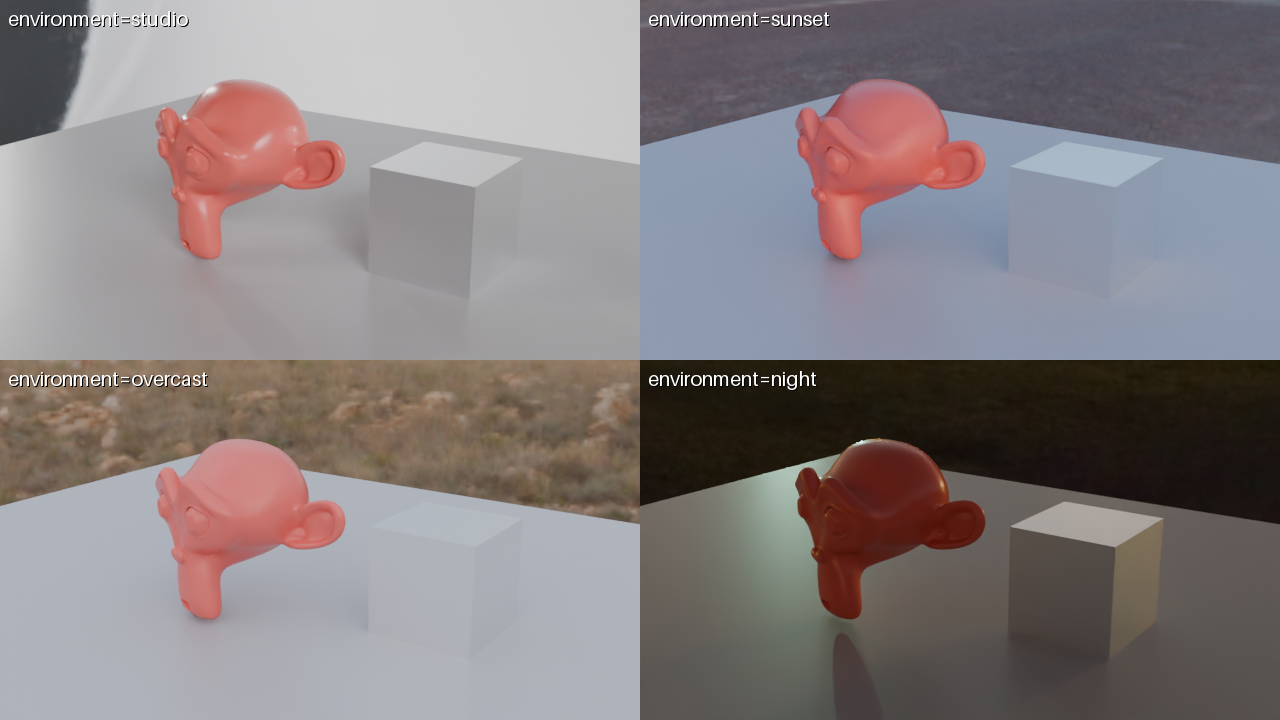
| preview (compare) | bpy script (monkey + floor) | 1 x 4 presets | 320x180 tiles | 16 | studio / sunset / overcast / night | 2.6 | 5 s | 0.3 JPY | sheet.png with labels | HTTP API |
| preview (orbit) | bpy script (monkey + floor) | 4 angles (0/90/180/270 deg) | 320x180 tiles | 8 | sunset | 2.5 | 7 s | 0.2 JPY | sheet.png | HTTP API |
| final (orbit) | bpy script (monkey + metal cube) | 48 (one full turn) | 960x540 | 24 | studio | 75.7 | 80 s | 7.6 JPY | output.mp4 (24 fps) | HTTP API |
Using JANCTION Render, build a glossy red cube rotating on a grey floor and show me a 4-frame preview.Render 24 frames at 1280x720 as an MP4.janction-render render cube_scene.py --frames 1-48 --size 1280x720 --samples 64 --waitRender the final 48 frames at 1080p with 128 samples.Show me one preview frame at 960x540.POST /v1/files pyramid.gltf, then POST /v1/jobs {kind: preview, environment: studio, environment_visible: false}blender="5.2", environment="night"POST /v1/jobs {kind: final, engine: "eevee", output: "webm", frame_start: 1, frame_end: 24, width: 960, height: 540, samples: 32}Same scene on Cycles: POST /v1/jobs {kind: final, frame_start: 1, frame_end: 24, width: 960, height: 540, samples: 32}output: "prores"engine: "eevee" (slower than Cycles for a preview: EEVEE compiles shaders for about 7 s in every fresh container; the same 4 frames on Cycles took 2.2 GPU s)POST /v1/jobs {kind: preview, environment: "compare", width: 640, height: 360, samples: 16} (all four presets in one Blender session)orbit=true, environment="sunset"render_final(orbit=true, orbit_frames=48, width=960, height=540, samples=24, environment="studio")Updated 2026-10-20. Operated by JasmyLab Inc.