Updated 2026-10-02
In ChatGPT, add https://render.janction.jp/mcp as a connector (Settings → Connectors → Advanced → Developer mode → Create). Then describe a scene: ChatGPT writes the bpy script, JANCTION Render previews it on a GPU in a few seconds and renders the final MP4. Free beta, no sign-up. A ChatGPT / Codex plugin is also submitted (in review as of 2026-10-02).
https://render.janction.jp/mcp → authentication OAuth → Create.Developer mode is not available on every ChatGPT plan; the plugin (in review) will make this a one-click install. Codex users can use codex mcp add instead.
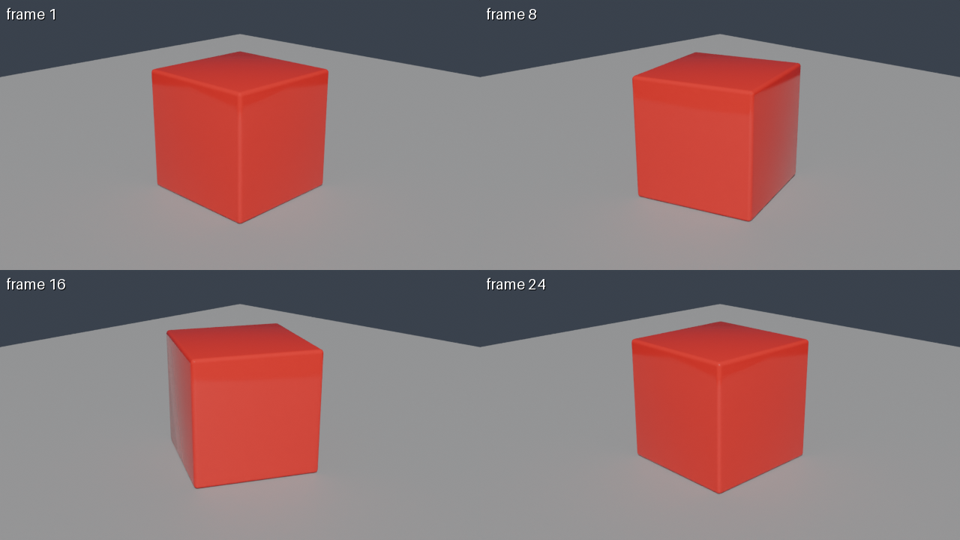
Using JANCTION Render, build a glossy red cube rotating on a grey floor and show me a 4-frame preview.
If it looks right, render 24 frames at 1280x720 as an MP4.
scene_info reads the scene without rendering: cameras, frame range, objects, missing files.render_preview renders 1-4 frames at 720p in a few GPU seconds and returns the image, so the agent can look, fix the script and try again.render_estimate says how long the final render takes ("about 3 minutes") and whether it fits today's free quota.render_final renders the frames on GPUs and joins them into an MP4; render_status reports the remaining time; render_download returns the files or links.| job | GPU time | note |
|---|---|---|
| preview, 4 frames (720p split in 4 tiles, 16 samples, denoised) | about 4 s | round trip about 8 s; the image comes back inline |
| final, 24 frames at 1280x720, 64 samples → MP4 | about 60 s | measured 2026-09-30 / 10-01 (59 s and 58 s) |
| final, one 1920x1080 frame at 128 samples | about 11 s | the estimator's baseline; heavy scenes take longer |
render_estimate gives the number before rendering; once a scene has been rendered once, the estimate uses that scene's own measurement.
Free beta (as of 2026-10-02): 10 GPU-minutes per key per day (20 per network), final renders up to 240 frames at 1080p. No sign-up: connecting creates a key. Inputs and results are deleted 24 hours after last use and never used for training. Paid plans will be announced on this site and in llms.txt before they start.
ChatGPT cannot run Blender on your computer, and even a local Blender needs a GPU for Cycles to be fast. With the connector, the scene is written as a bpy script, sent to a datacenter GPU, and the image comes back into the conversation. Nothing is installed locally.
Developer mode is available on paid plans; check OpenAI's current help page. The plugin submission (in review) is meant to remove this step.
Put it on an https URL (a cloud drive link that serves the file directly) and pass it as scene_url, or use Codex / Claude Code with the stdio server to send local files.
No, during the free beta: 10 GPU-minutes per key per day. Paid plans will be announced on this site first.
JANCTION Render v0.3.2 · JasmyLab Inc. · 日本語