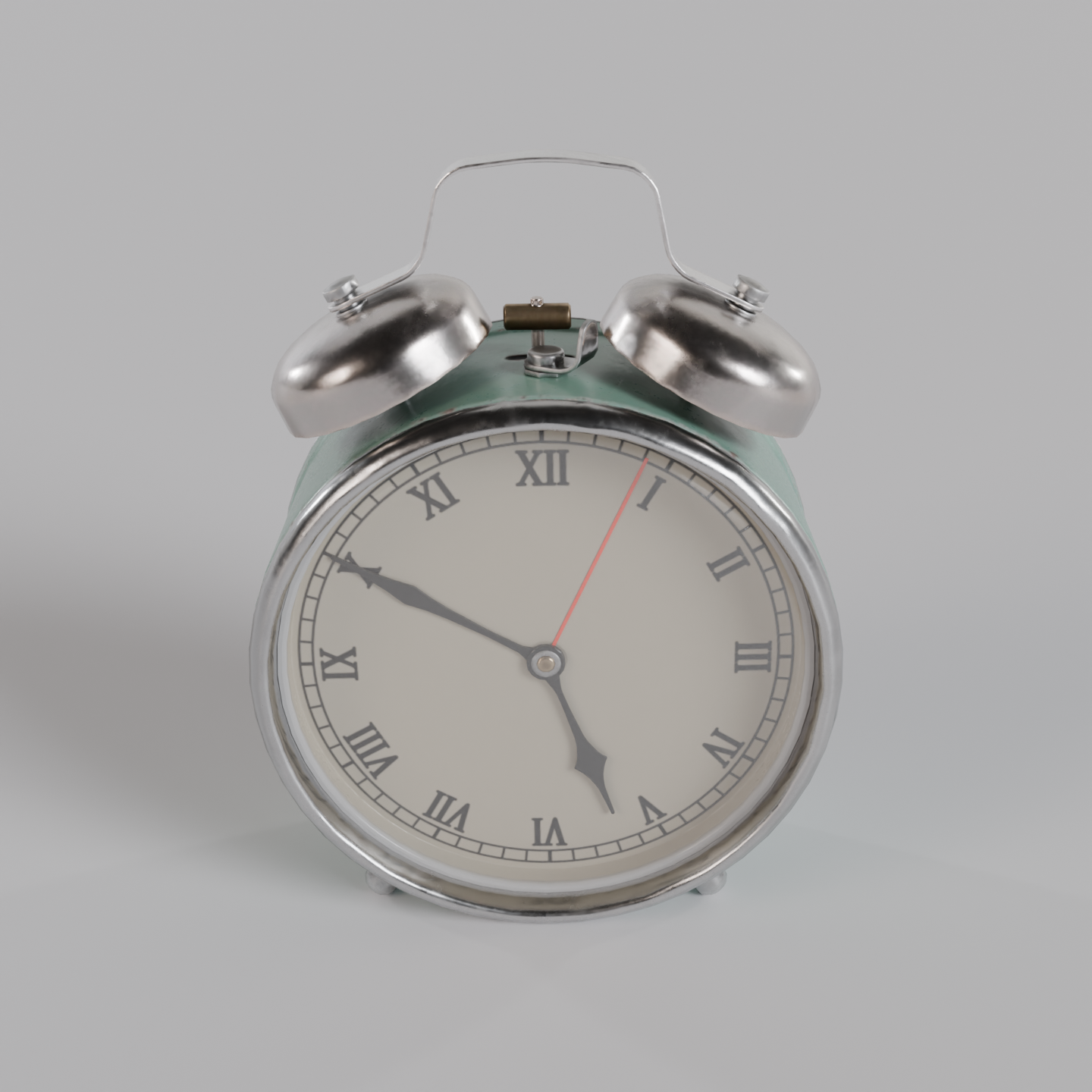
Product shots of a real 3D model: an alarm clock (Poly Haven, CC0), preset='product'. A real render from the production GPU, the bpy script that produced it, the settings and the GPU seconds. Pass the script's URL as scene_url to get the same result.
| Prompt | Render https://render.janction.jp/samples/ex21_product_clock.py with asset_urls=['polyhaven:alarm_clock_01'], preset='product', orbit_elevation=25 and orbit_distance=0.85 (4 studio shots, 1440x1440). |
|---|---|
| MCP call | render_final(scene_url="https://render.janction.jp/samples/ex21_product_clock.py", asset_urls=["polyhaven:alarm_clock_01"], preset="product", orbit_elevation=25, orbit_distance=0.85) |
| GPU s / round trip | 20.4 s / 14 s |
| Price at 0.1 JPY per GPU-second | 2.0 JPY (0 while the free time covers it) |
| Rendered on | 2026-10-20 |
| Blender | 5.0 |
ChatGPT · Claude · Grok · Perplexity
Use JANCTION Render (MCP server https://render.janction.jp/mcp) to render this example: render_preview(scene_url="https://render.janction.jp/samples/ex21_product_clock.py", asset_urls=["polyhaven:alarm_clock_01"]). Then suggest how to change the colors, shapes and camera for my own subject. Ask me before the final render.
Each link opens the app with the text below filled in (if it is not, copy and paste it). If JANCTION Render is not connected in that app yet, add https://render.janction.jp/mcp as a connector first.
| preset | product |
|---|---|
| orbit_elevation | 25 |
| orbit_distance | 0.85 |
ex21_product_clock.py. It builds the scene, the camera and the frame range; resolution, samples, denoising and the GPU are set by the service.
"""JANCTION Render examples 21 and 22: an alarm clock, a real 3D model from Poly Haven (CC0, "alarm_clock_01").

Reproduce: render_final(scene_url="https://render.janction.jp/samples/ex21_product_clock.py",
                        asset_urls=["polyhaven:alarm_clock_01"], preset="product",
                        orbit_elevation=25, orbit_distance=0.85)      # 4 studio shots, 1440x1440
           render_final(scene_url="https://render.janction.jp/samples/ex21_product_clock.py",
                        asset_urls=["polyhaven:alarm_clock_01"], preset="turntable",
                        orbit_elevation=25, orbit_distance=0.85)      # 360-degree MP4
No files to upload: the service fetches the model by name. The model is CC0 (https://polyhaven.com/a/alarm_clock_01).
The preset lights the studio and orbits the camera (25 degrees above, a little closer than the default); jr_assets.frame_camera() fits the model in the frame.
"""
import bpy
import jr_assets  # provided by the service in front of every scene script

for ob in list(bpy.data.objects):
    bpy.data.objects.remove(ob, do_unlink=True)

jr_assets.import_model("alarm_clock_01")            # about 23 x 17 x 17 cm, textures included

# the glTF's glass uses the (JPEG, no alpha) colour texture, so it imports opaque and hides the dial: make it clear glass
for m in bpy.data.materials:
    if "glass" in m.name.lower() and m.use_nodes:
        g = next(n for n in m.node_tree.nodes if n.type == "BSDF_PRINCIPLED")
        for link in list(g.inputs["Base Color"].links) + list(g.inputs["Alpha"].links):
            m.node_tree.links.remove(link)
        g.inputs["Base Color"].default_value = (1.0, 1.0, 1.0, 1.0)
        g.inputs["Roughness"].default_value = 0.02
        g.inputs["Alpha"].default_value = 0.12

# a soft light-grey floor that catches the shadow (frame_camera ignores floors)
bpy.ops.mesh.primitive_plane_add(size=60, location=(0.0, 0.0, 0.0))     # wide enough that its edge stays out of frame
floor = bpy.context.active_object
floor.name = "Floor"
mat = bpy.data.materials.new("Floor")
mat.use_nodes = True
bsdf = next(n for n in mat.node_tree.nodes if n.type == "BSDF_PRINCIPLED")
bsdf.inputs["Base Color"].default_value = (0.80, 0.80, 0.82, 1.0)
bsdf.inputs["Roughness"].default_value = 0.65
floor.data.materials.append(mat)

cam = jr_assets.frame_camera(margin=1.25)    # adds the camera and points it at the model
bpy.context.scene.camera = cam
JANCTION Render v0.4.152 · JasmyLab Inc. · Updated 2026-10-14 · Tested with Blender 3.6 / 4.2 / 4.5 / 5.0 / 5.2, JANCTION Render 0.4.152 · 日本語