SUNDAY, NOVEMBER 15, 2026

Render · Blender on RTX PRO 6000 · Tokyo
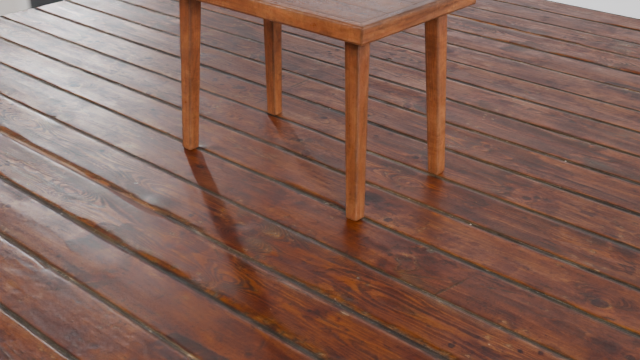
samples/polyhaven_room.py with polyhaven:wooden_table_02, wood_floor_deck, studio_small_09
Rendered from HTTP API / Python client through JANCTION Render
| resolution | 640 x 360 |
|---|---|
| frames | 1 |
| samples | 16 |
| engine | Cycles / Blender 5.0 |
| GPU time | 1.92 s (GPU/CUDA) |
Try these settings on your own model
Browser only, no sign-up. The first preview needs no payment.
Render this script with your own key
Browser only, no sign-up. The first preview needs no payment.
"""A room furnished from Poly Haven (CC0) by name: no files to upload.

Send this script with asset_urls (remote MCP) or assets (stdio / CLI) set to
    ["polyhaven:wooden_table_02", "polyhaven:wood_floor_deck", "polyhaven:studio_small_09"]
The service fetches the files into JR_ASSETS_DIR/<id>/ and the helpers below wire them up.
    janction-render preview samples/polyhaven_room.py --assets polyhaven:wooden_table_02 polyhaven:wood_floor_deck polyhaven:studio_small_09
"""
import math

import bpy
import jr_assets  # provided by the service in front of every scene script

for ob in list(bpy.data.objects):
    bpy.data.objects.remove(ob, do_unlink=True)
scene = bpy.context.scene
scene.frame_start, scene.frame_end = 1, 24

jr_assets.import_model("wooden_table_02")                      # 1.13 x 0.71 x 0.80 m, textures included
bpy.ops.mesh.primitive_plane_add(size=6)
floor = bpy.context.active_object
jr_assets.apply(floor, jr_assets.material("wood_floor_deck", scale=2.0))
jr_assets.world_hdri("studio_small_09", strength=1.0)

cam = bpy.data.objects.new("Camera", bpy.data.cameras.new("Camera"))
scene.collection.objects.link(cam)
scene.camera = cam
cam.location = (2.4, -2.6, 1.7)
cam.rotation_euler = (math.radians(63), 0, math.radians(42))
ChatGPT · Claude · Grok · Perplexity
Use JANCTION Render (MCP server https://render.janction.jp/mcp) to make a render like this one: https://render.janction.jp/r/lsw9tohtoq . First ask me what to change (my own model or scene, colors, camera), preview first, and ask me before the final render.
Each link opens the app with the text below filled in (if it is not, copy and paste it). If JANCTION Render is not connected in that app yet, add https://render.janction.jp/mcp as a connector first.
Rendered with JANCTION Render, a Blender render farm for AI agents (new keys start free). Render your own .blend or bpy script: see how to connect, or add the MCP URL https://render.janction.jp/mcp?src=share to Claude.ai, ChatGPT, Cursor or any MCP client. Report a problem with this page at the support page.
Was the result what you asked for?
Creators whose work is shown here may have received GPU credit from JasmyLab as thanks for publishing it. The amount does not depend on what they say, and their posts are not edited.