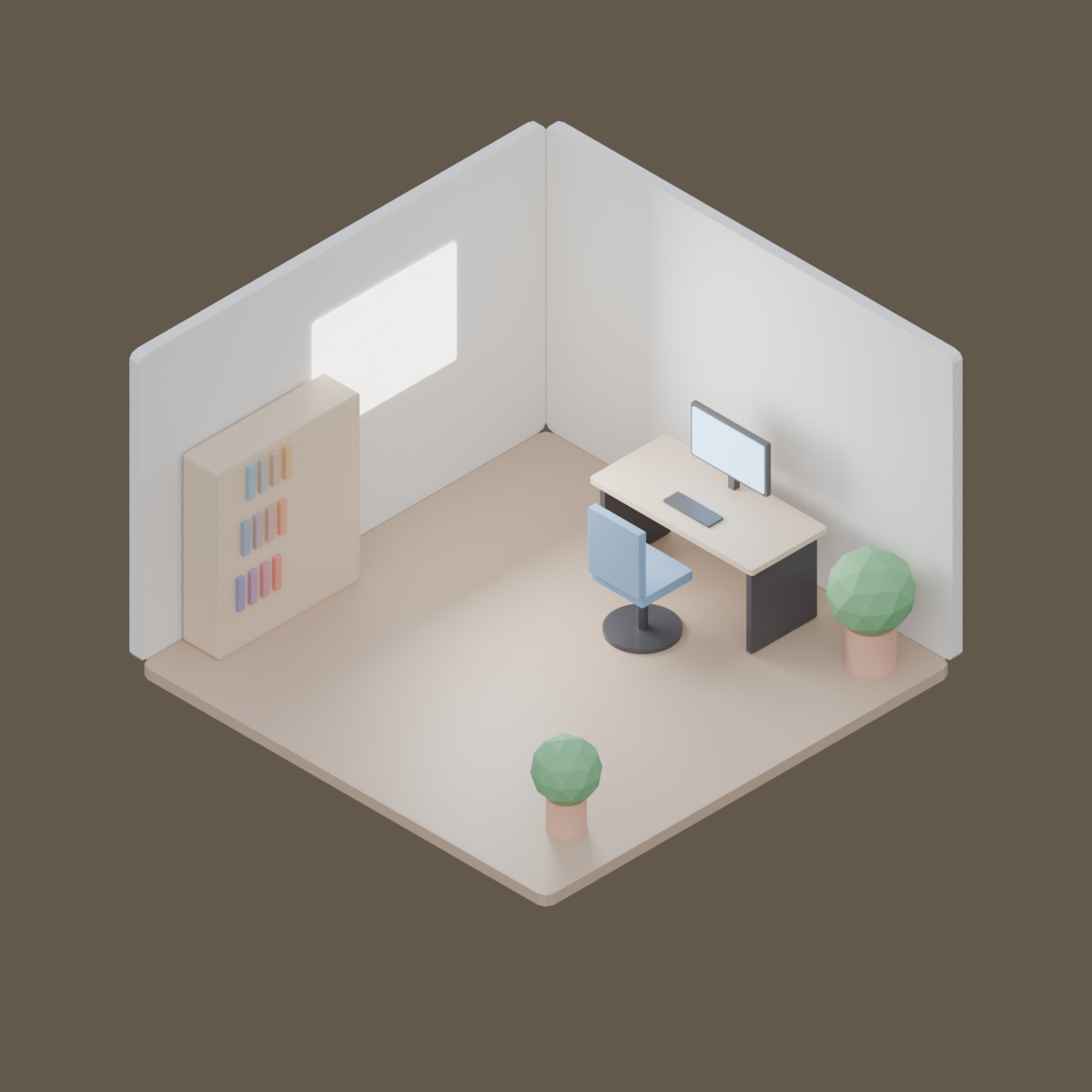
Isometric office corner with an orthographic camera. A real render from the production GPU, the bpy script that produced it, the settings and the GPU seconds. Pass the script's URL as scene_url to get the same result.
| Prompt | Render https://render.janction.jp/samples/ex25_isometric_office.py as a 1200x1200 still, 128 samples, overcast preset. |
|---|---|
| MCP call | render_final(scene_url="https://render.janction.jp/samples/ex25_isometric_office.py", frame_start=1, frame_end=1, samples=128, output="png", width=1200, height=1200, environment="overcast") |
| GPU s / round trip | 3.7 s / 4 s |
| Price at 0.1 JPY per GPU-second | 0.4 JPY (0 while the free time covers it) |
| Rendered on | 2026-10-23 |
| Blender | 5.0 |
ChatGPT · Claude · Grok · Perplexity
Use JANCTION Render (MCP server https://render.janction.jp/mcp) to render this example: render_preview(scene_url="https://render.janction.jp/samples/ex25_isometric_office.py"). Then suggest how to change the colors, shapes and camera for my own subject. Ask me before the final render.
Each link opens the app with the text below filled in (if it is not, copy and paste it). If JANCTION Render is not connected in that app yet, add https://render.janction.jp/mcp as a connector first.
| frame_start | 1 |
|---|---|
| frame_end | 1 |
| samples | 128 |
| denoise | True |
| output | png |
| width | 1200 |
| height | 1200 |
| environment | overcast |
ex25_isometric_office.py. It builds the scene, the camera and the frame range; resolution, samples, denoising and the GPU are set by the service.
"""JANCTION Render example 25: an isometric office corner with an orthographic camera (one still).

Reproduce: render_final(scene_url="https://render.janction.jp/samples/ex25_isometric_office.py",
                        width=1200, height=1200, samples=128, environment="overcast")
Two walls, a floor, a desk with a monitor, a chair, a shelf, plants and a bright window, all from cubes and
cylinders. The camera is orthographic at the classic isometric angles (54.7 and 45 degrees).
"""
import math

import bpy
from mathutils import Vector

for ob in list(bpy.data.objects):
    bpy.data.objects.remove(ob, do_unlink=True)
scene = bpy.context.scene
scene.frame_start = 1
scene.frame_end = 1


def material(name, color, roughness=0.6, emission=0.0):
    mat = bpy.data.materials.new(name)
    bsdf = mat.node_tree.nodes["Principled BSDF"]
    bsdf.inputs["Base Color"].default_value = (*color, 1.0)
    bsdf.inputs["Roughness"].default_value = roughness
    if emission:
        bsdf.inputs["Emission Color"].default_value = (*color, 1.0)
        bsdf.inputs["Emission Strength"].default_value = emission
    return mat


def box(name, size, location, mat, rotation=0.0):
    bpy.ops.mesh.primitive_cube_add(size=1, location=location)
    ob = bpy.context.active_object
    ob.name = name
    ob.scale = size
    ob.rotation_euler = (0, 0, rotation)
    ob.data.materials.append(mat)
    bev = ob.modifiers.new("Bevel", "BEVEL")
    bev.width = 0.02
    bev.segments = 2
    return ob


def cyl(name, radius, depth, location, mat, vertices=32):
    bpy.ops.mesh.primitive_cylinder_add(vertices=vertices, radius=radius, depth=depth, location=location)
    ob = bpy.context.active_object
    ob.name = name
    ob.data.materials.append(mat)
    return ob


wall = material("Wall", (0.86, 0.84, 0.8))
floor = material("Floor", (0.55, 0.4, 0.28), roughness=0.45)
wood = material("Desk", (0.72, 0.56, 0.4), roughness=0.4)
dark = material("Dark", (0.06, 0.06, 0.07), roughness=0.3)
screen = material("Screen", (0.35, 0.65, 1.0), emission=2.5)
fabric = material("Fabric", (0.2, 0.35, 0.55), roughness=0.8)
leaf = material("Leaf", (0.18, 0.45, 0.2), roughness=0.7)
pot = material("Pot", (0.75, 0.42, 0.3), roughness=0.5)
glow = material("Window", (1.0, 0.95, 0.85), emission=4.0)

box("Floor", (4, 4, 0.1), (0, 0, -0.05), floor)
box("WallBack", (4, 0.1, 2.6), (0, 2.05, 1.3), wall)
box("WallLeft", (0.1, 4, 2.6), (-2.05, 0, 1.3), wall)
box("Window", (0.02, 1.4, 1.0), (-1.99, 0.4, 1.55), glow)

box("DeskTop", (1.6, 0.75, 0.05), (0.2, 1.4, 0.75), wood)
for dx in (-0.72, 0.72):
    box("DeskLeg", (0.05, 0.65, 0.72), (0.2 + dx, 1.4, 0.37), dark)
box("Monitor", (0.75, 0.04, 0.45), (0.2, 1.62, 1.12), dark)
box("MonitorScreen", (0.7, 0.01, 0.4), (0.2, 1.595, 1.12), screen)
box("Stand", (0.06, 0.06, 0.2), (0.2, 1.65, 0.86), dark)
box("Keyboard", (0.45, 0.15, 0.02), (0.2, 1.25, 0.785), dark)

box("Seat", (0.5, 0.5, 0.08), (0.2, 0.75, 0.48), fabric)
box("Back", (0.5, 0.07, 0.55), (0.2, 0.5, 0.8), fabric)
cyl("ChairPost", 0.04, 0.42, (0.2, 0.75, 0.22), dark)
cyl("ChairBase", 0.28, 0.04, (0.2, 0.75, 0.02), dark)

box("Shelf", (0.35, 1.4, 1.6), (-1.8, -0.9, 0.8), wood)
for i, z in enumerate((0.35, 0.8, 1.25)):
    for j in range(4):
        box(f"Book{i}{j}", (0.22, 0.06, 0.28), (-1.7, -1.4 + j * 0.12 + i * 0.05, z + 0.14), material(f"Book{i}{j}", (0.3 + 0.15 * j, 0.25 + 0.1 * i, 0.5 - 0.1 * j)))

for k, (x, y, s) in enumerate(((1.6, 1.6, 1.0), (1.5, -1.3, 0.8))):
    cyl(f"Pot{k}", 0.18 * s, 0.35 * s, (x, y, 0.175 * s), pot)
    bpy.ops.mesh.primitive_ico_sphere_add(subdivisions=2, radius=0.32 * s, location=(x, y, 0.62 * s))
    bush = bpy.context.active_object
    bush.data.materials.append(leaf)

bpy.ops.object.light_add(type="AREA", location=(-1.0, 0.4, 1.6))
win = bpy.context.active_object
win.data.energy = 120
win.data.size = 1.2
win.rotation_euler = (0, math.radians(-90), 0)

# アイソメ: 部屋の中心から (1, -1, 1) の向きに離し、平行投影の幅を部屋の大きさに合わせる
center = Vector((0.0, 0.0, 1.0))
bpy.ops.object.camera_add(location=center + Vector((1.0, -1.0, 1.0)) * 12)
cam = bpy.context.active_object
cam.data.type = "ORTHO"
cam.data.ortho_scale = 7.6
cam.rotation_euler = (center - cam.location).to_track_quat("-Z", "Y").to_euler()
scene.camera = cam
JANCTION Render v0.4.209 · JasmyLab Inc. · Updated 2026-10-26 · Tested with Blender 3.6 / 4.2 / 4.5 / 5.0 / 5.2, JANCTION Render 0.4.209 · 日本語