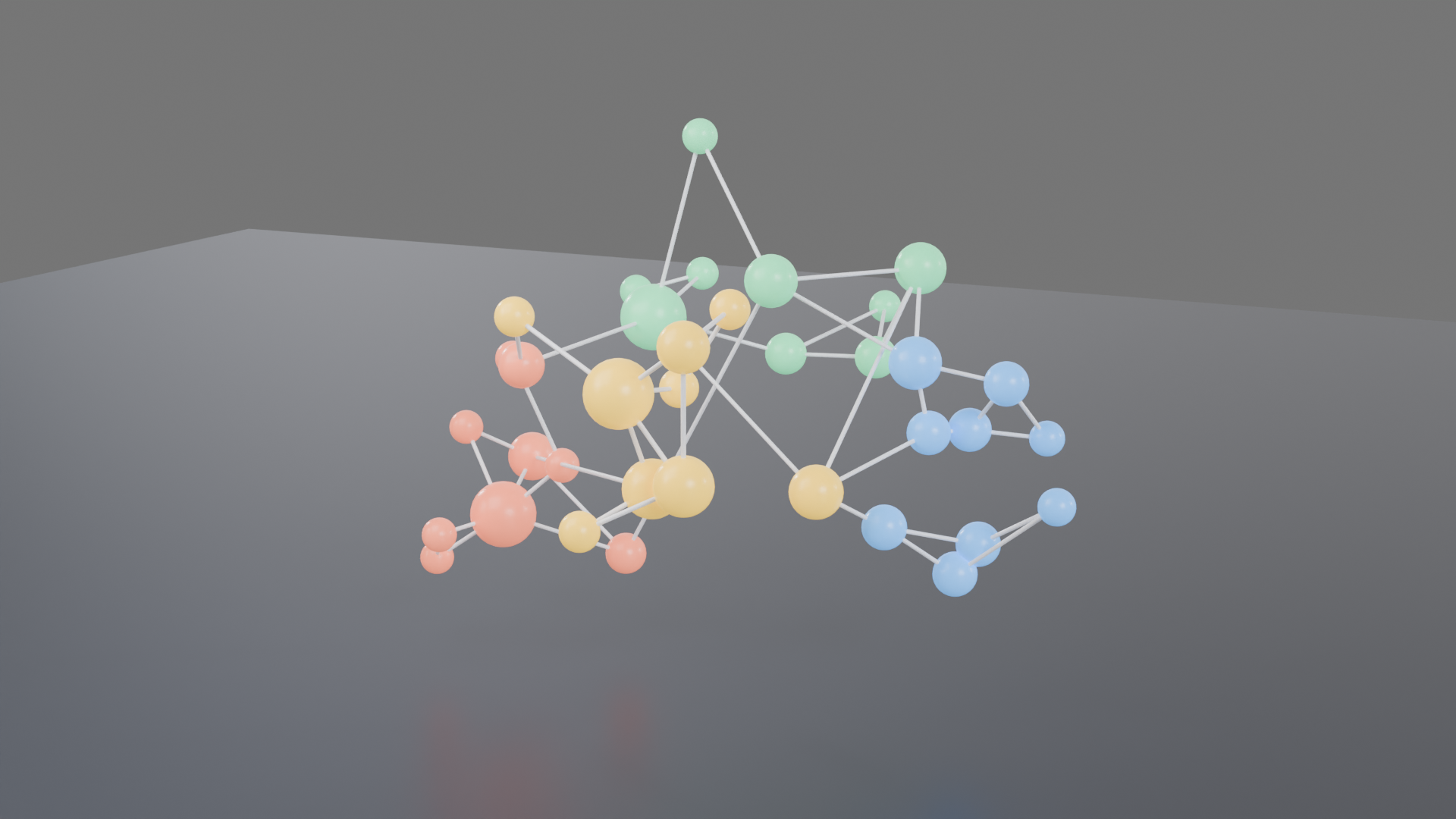
Data visualization: a 3D network graph in four clusters. A real render from the production GPU, the bpy script that produced it, the settings and the GPU seconds. Pass the script's URL as scene_url to get the same result.
| Prompt | Render https://render.janction.jp/samples/ex28_network_graph.py at 1920x1080, 128 samples, studio preset with environment_visible=False (replace NODES and EDGES with your own data). |
|---|---|
| MCP call | render_final(scene_url="https://render.janction.jp/samples/ex28_network_graph.py", frame_start=1, frame_end=1, samples=128, output="png", width=1920, height=1080, environment="studio") |
| GPU s / round trip | 4.9 s / 5 s |
| Price at 0.1 JPY per GPU-second | 0.5 JPY (0 while the free time covers it) |
| Rendered on | 2026-10-26 |
| Blender | 5.0 |
ChatGPT · Claude · Grok · Perplexity
Use JANCTION Render (MCP server https://render.janction.jp/mcp) to render this example: render_preview(scene_url="https://render.janction.jp/samples/ex28_network_graph.py"). Then suggest how to change the colors, shapes and camera for my own subject. Ask me before the final render.
Each link opens the app with the text below filled in (if it is not, copy and paste it). If JANCTION Render is not connected in that app yet, add https://render.janction.jp/mcp as a connector first.
| frame_start | 1 |
|---|---|
| frame_end | 1 |
| samples | 128 |
| denoise | True |
| output | png |
| width | 1920 |
| height | 1080 |
| environment | studio |
| environment_visible | False |
ex28_network_graph.py. It builds the scene, the camera and the frame range; resolution, samples, denoising and the GPU are set by the service.
"""JANCTION Render example 28: a 3D network graph, nodes in four clusters joined by edges (data visualization, one still).

Reproduce: render_final(scene_url="https://render.janction.jp/samples/ex28_network_graph.py",
                        width=1920, height=1080, samples=128, environment="studio",
                        environment_visible=False)
Nodes are spheres sized by degree and coloured by cluster; edges are thin cylinders between each node and its
two nearest neighbours, plus a few links between clusters. Replace NODES and EDGES with your own data.
"""
import math
import random

import bpy
import jr_assets
from mathutils import Vector

for ob in list(bpy.data.objects):
    bpy.data.objects.remove(ob, do_unlink=True)
scene = bpy.context.scene
scene.frame_start = 1
scene.frame_end = 1
random.seed(28)
CLUSTERS = [((-2.2, 0.0, 1.6), (0.95, 0.22, 0.12)), ((2.0, 0.6, 1.9), (0.1, 0.4, 0.95)),
            ((0.0, 1.8, 3.2), (0.12, 0.75, 0.35)), ((0.4, -1.6, 2.8), (0.98, 0.62, 0.05))]


def material(name, color, roughness=0.3, emission=0.0):
    mat = bpy.data.materials.new(name)
    bsdf = mat.node_tree.nodes["Principled BSDF"]
    bsdf.inputs["Base Color"].default_value = (*color, 1.0)
    bsdf.inputs["Roughness"].default_value = roughness
    if emission:
        bsdf.inputs["Emission Color"].default_value = (*color, 1.0)
        bsdf.inputs["Emission Strength"].default_value = emission
    return mat


# データ: 各クラスタに 9 つの点(中心のまわりに散らす)
NODES = []                      # (位置, クラスタ番号)
for c, (center, _color) in enumerate(CLUSTERS):
    for _ in range(9):
        offset = Vector((random.gauss(0, 0.7), random.gauss(0, 0.7), random.gauss(0, 0.5)))
        NODES.append((Vector(center) + offset, c))
EDGES = set()
for i, (p, _c) in enumerate(NODES):
    near = sorted(range(len(NODES)), key=lambda j: (NODES[j][0] - p).length)[1:3]
    for j in near:
        EDGES.add((min(i, j), max(i, j)))
for _ in range(6):              # クラスタをまたぐつながり
    i, j = random.sample(range(len(NODES)), 2)
    if NODES[i][1] != NODES[j][1]:
        EDGES.add((min(i, j), max(i, j)))

degree = [0] * len(NODES)
for i, j in EDGES:
    degree[i] += 1
    degree[j] += 1

node_mats = [material(f"Cluster{c}", color, emission=1.2) for c, (_p, color) in enumerate(CLUSTERS)]
edge_mat = material("Edge", (0.8, 0.82, 0.88), roughness=0.4, emission=0.4)
spheres = []
for i, (p, c) in enumerate(NODES):
    bpy.ops.mesh.primitive_uv_sphere_add(segments=32, ring_count=16, radius=0.08 + 0.035 * degree[i], location=p)
    s = bpy.context.active_object
    s.name = f"Node{i:02d}"
    s.data.materials.append(node_mats[c])
    bpy.ops.object.shade_smooth()
    spheres.append(s)
for i, j in EDGES:
    a, b = NODES[i][0], NODES[j][0]
    d = b - a
    bpy.ops.mesh.primitive_cylinder_add(vertices=12, radius=0.018, depth=d.length, location=(a + b) / 2)
    e = bpy.context.active_object
    e.name = f"Edge{i:02d}_{j:02d}"
    e.rotation_euler = d.to_track_quat("Z", "Y").to_euler()
    e.data.materials.append(edge_mat)

bpy.ops.mesh.primitive_plane_add(size=40, location=(0, 0, 0))
floor = bpy.context.active_object
floor.data.materials.append(material("Floor", (0.025, 0.03, 0.045), roughness=0.35))   # 濃紺の床で色を立てる

bpy.ops.object.light_add(type="AREA", location=(-3, -4, 7))
key = bpy.context.active_object
key.data.energy = 500
key.data.size = 5
key.rotation_euler = (math.radians(35), math.radians(-25), 0)

bpy.ops.object.camera_add(location=(4.5, -9.0, 5.0))
cam = bpy.context.active_object
cam.data.lens = 50
scene.camera = cam
jr_assets.frame_camera(margin=1.12, objects=spheres)
JANCTION Render v0.4.209 · JasmyLab Inc. · Updated 2026-10-26 · Tested with Blender 3.6 / 4.2 / 4.5 / 5.0 / 5.2, JANCTION Render 0.4.209 · 日本語