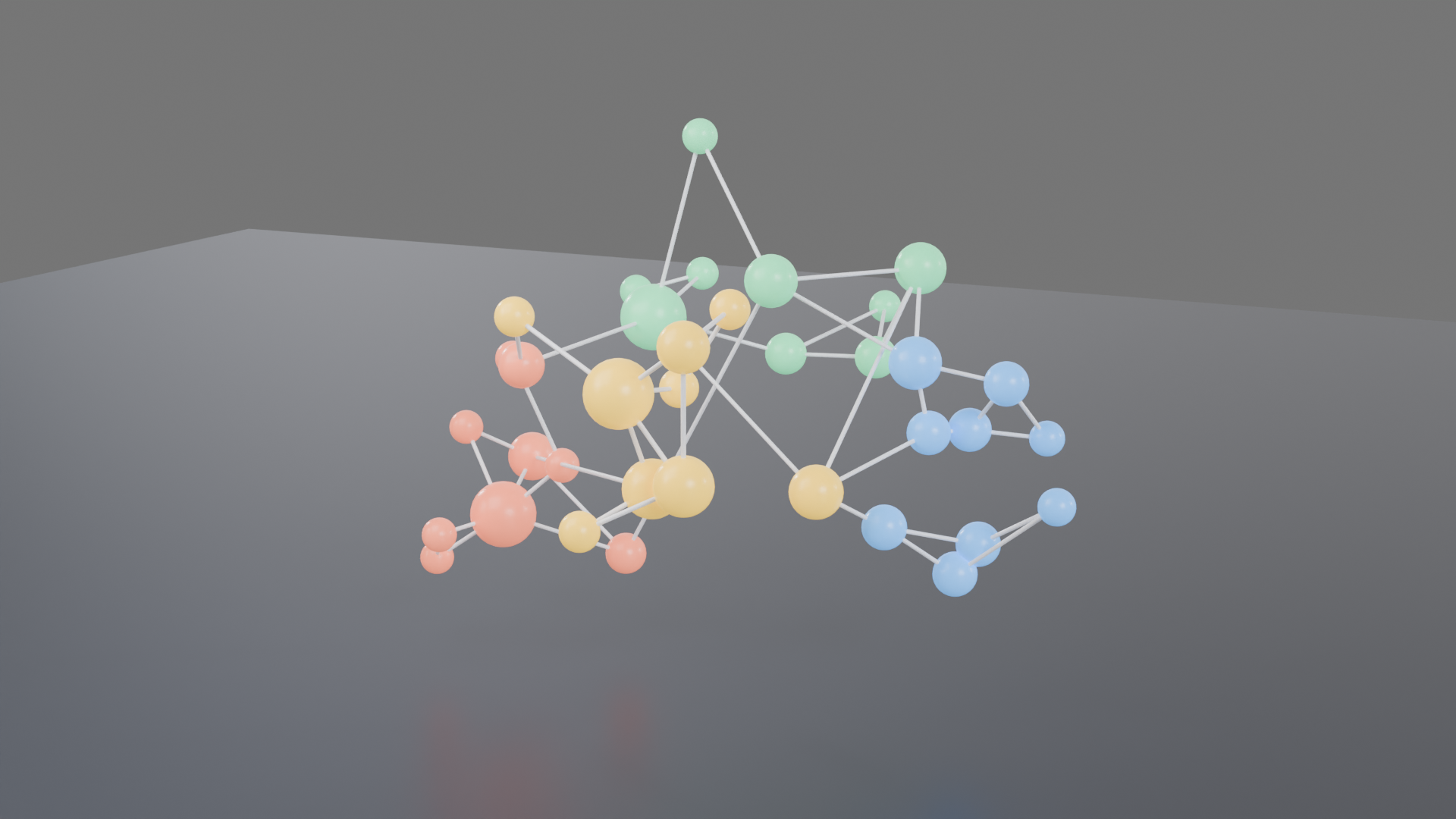
データ可視化: 4 つの塊に分かれた 3D のネットワーク図。本番の GPU で描いた本物の結果と、そのまま動く bpy スクリプト、設定、GPU 秒。スクリプトの URL を scene_url に渡せば同じものが出ます。
| 頼んだ文 | https://render.janction.jp/samples/ex28_network_graph.py を studio プリセット(environment_visible=False)、1920x1080、128 サンプルで描いて(NODES と EDGES を自分のデータに)。 |
|---|---|
| MCP の呼び出し | render_final(scene_url="https://render.janction.jp/samples/ex28_network_graph.py", frame_start=1, frame_end=1, samples=128, output="png", width=1920, height=1080, environment="studio") |
| GPU 秒 / 往復 | 4.9 s / 5 s |
| 料金の目安(0.1 円/GPU 秒) | 0.5 JPY (無料の残りの中なら 0 円) |
| 描いた日 | 2026-10-26 |
| Blender | 5.0 |
ChatGPT · Claude · Grok · Perplexity
JANCTION Render(MCP サーバー https://render.janction.jp/mcp)で、この作例を描いて: render_preview(scene_url="https://render.janction.jp/samples/ex28_network_graph.py")。そのあと、私の題材に合わせて色・形・カメラを変える案を出して。仕上げの前に確認して。
リンクを押すと、下の文が入った状態でそのアプリが開きます(入らないときは写して貼ってください)。そのアプリに JANCTION Render をまだつないでいなければ、先にコネクタとして https://render.janction.jp/mcp を足してください。
| frame_start | 1 |
|---|---|
| frame_end | 1 |
| samples | 128 |
| denoise | True |
| output | png |
| width | 1920 |
| height | 1080 |
| environment | studio |
| environment_visible | False |
ex28_network_graph.py。シーン・カメラ・コマ範囲だけを組み、解像度・サンプル・ノイズ除去・GPU はサービスが決めます。
"""JANCTION Render example 28: a 3D network graph, nodes in four clusters joined by edges (data visualization, one still).

Reproduce: render_final(scene_url="https://render.janction.jp/samples/ex28_network_graph.py",
                        width=1920, height=1080, samples=128, environment="studio",
                        environment_visible=False)
Nodes are spheres sized by degree and coloured by cluster; edges are thin cylinders between each node and its
two nearest neighbours, plus a few links between clusters. Replace NODES and EDGES with your own data.
"""
import math
import random

import bpy
import jr_assets
from mathutils import Vector

for ob in list(bpy.data.objects):
    bpy.data.objects.remove(ob, do_unlink=True)
scene = bpy.context.scene
scene.frame_start = 1
scene.frame_end = 1
random.seed(28)
CLUSTERS = [((-2.2, 0.0, 1.6), (0.95, 0.22, 0.12)), ((2.0, 0.6, 1.9), (0.1, 0.4, 0.95)),
            ((0.0, 1.8, 3.2), (0.12, 0.75, 0.35)), ((0.4, -1.6, 2.8), (0.98, 0.62, 0.05))]


def material(name, color, roughness=0.3, emission=0.0):
    mat = bpy.data.materials.new(name)
    bsdf = mat.node_tree.nodes["Principled BSDF"]
    bsdf.inputs["Base Color"].default_value = (*color, 1.0)
    bsdf.inputs["Roughness"].default_value = roughness
    if emission:
        bsdf.inputs["Emission Color"].default_value = (*color, 1.0)
        bsdf.inputs["Emission Strength"].default_value = emission
    return mat


# データ: 各クラスタに 9 つの点(中心のまわりに散らす)
NODES = []                      # (位置, クラスタ番号)
for c, (center, _color) in enumerate(CLUSTERS):
    for _ in range(9):
        offset = Vector((random.gauss(0, 0.7), random.gauss(0, 0.7), random.gauss(0, 0.5)))
        NODES.append((Vector(center) + offset, c))
EDGES = set()
for i, (p, _c) in enumerate(NODES):
    near = sorted(range(len(NODES)), key=lambda j: (NODES[j][0] - p).length)[1:3]
    for j in near:
        EDGES.add((min(i, j), max(i, j)))
for _ in range(6):              # クラスタをまたぐつながり
    i, j = random.sample(range(len(NODES)), 2)
    if NODES[i][1] != NODES[j][1]:
        EDGES.add((min(i, j), max(i, j)))

degree = [0] * len(NODES)
for i, j in EDGES:
    degree[i] += 1
    degree[j] += 1

node_mats = [material(f"Cluster{c}", color, emission=1.2) for c, (_p, color) in enumerate(CLUSTERS)]
edge_mat = material("Edge", (0.8, 0.82, 0.88), roughness=0.4, emission=0.4)
spheres = []
for i, (p, c) in enumerate(NODES):
    bpy.ops.mesh.primitive_uv_sphere_add(segments=32, ring_count=16, radius=0.08 + 0.035 * degree[i], location=p)
    s = bpy.context.active_object
    s.name = f"Node{i:02d}"
    s.data.materials.append(node_mats[c])
    bpy.ops.object.shade_smooth()
    spheres.append(s)
for i, j in EDGES:
    a, b = NODES[i][0], NODES[j][0]
    d = b - a
    bpy.ops.mesh.primitive_cylinder_add(vertices=12, radius=0.018, depth=d.length, location=(a + b) / 2)
    e = bpy.context.active_object
    e.name = f"Edge{i:02d}_{j:02d}"
    e.rotation_euler = d.to_track_quat("Z", "Y").to_euler()
    e.data.materials.append(edge_mat)

bpy.ops.mesh.primitive_plane_add(size=40, location=(0, 0, 0))
floor = bpy.context.active_object
floor.data.materials.append(material("Floor", (0.025, 0.03, 0.045), roughness=0.35))   # 濃紺の床で色を立てる

bpy.ops.object.light_add(type="AREA", location=(-3, -4, 7))
key = bpy.context.active_object
key.data.energy = 500
key.data.size = 5
key.rotation_euler = (math.radians(35), math.radians(-25), 0)

bpy.ops.object.camera_add(location=(4.5, -9.0, 5.0))
cam = bpy.context.active_object
cam.data.lens = 50
scene.camera = cam
jr_assets.frame_camera(margin=1.12, objects=spheres)
JANCTION Render v0.4.209 · JasmyLab Inc. · 更新 2026-10-26 · 検証 Blender 3.6 / 4.2 / 4.5 / 5.0 / 5.2, JANCTION Render 0.4.209 · English