On grok.com, open Plugins → New connector → Custom and add https://render.janction.jp/mcp; approving the consent page creates a free key. Then ask Grok to use JANCTION Render. Files attached in a Grok chat do not reach the connector, so drop your .blend at https://render.janction.jp/upload and paste the link it gives. Each new key starts with a welcome credit of up to 500 JPY (14 days); after that, previews stay free up to 2 GPU-minutes a day and finals cost 0.1 JPY per GPU-second.
Updated 2026-10-26
What it does Your own .blend, bpy script or 3D file (glTF/GLB, FBX, USD, OBJ...) rendered to images or video on a cloud NVIDIA GPU, from an AI app, the terminal or the browser. The first preview needs no payment.
What it does not do It does not speed up the Blender viewport on your machine, does not take non-Blender video, simulations or general GPU jobs, and an AI that is not connected cannot render on its own.
Paste your AI's script and tryTry your own file for free
Browser only; no connector or CLI needed. A 100 JPY welcome credit for a new key (14 days, no card; one per network every 30 days, further keys on the same network share what is left), and 400 JPY more for saving a card that is not charged (once per card); after that, previews stay free up to 2 GPU-minutes a day and finals cost 0.1 JPY per GPU-second.
https://render.janction.jp/mcp → Add connector.Files attached in a Grok chat do not reach connector tools: on 2026-10-22 Grok tried to pass an attached .blend and the tool could not fetch it. Drop the file at /upload instead (no sign-up, the link works for 12 hours) and paste the link: "Render a preview of this file: <link>". In the same test the 4-frame preview came back in about 30 seconds.
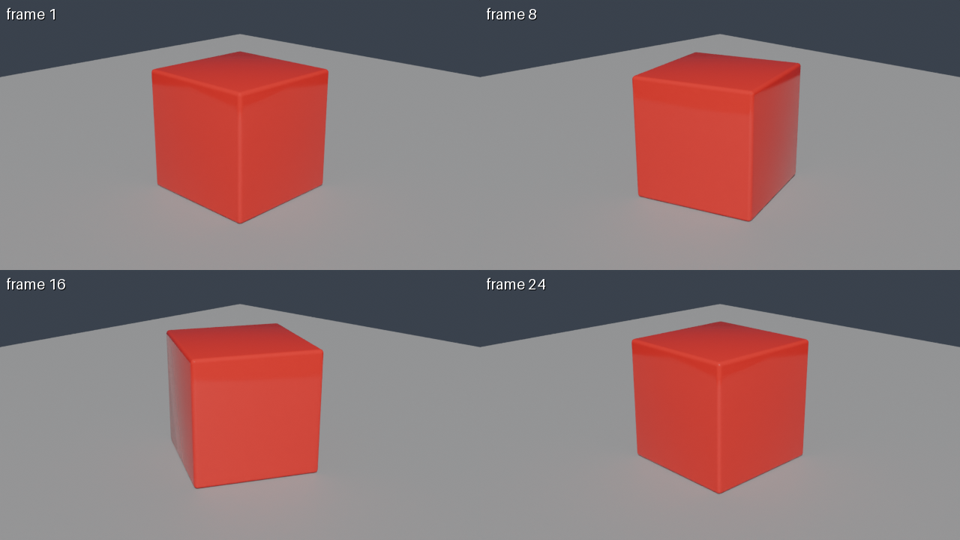
Using JANCTION Render, build a glossy red cube rotating on a grey floor and show me a 4-frame preview.
If it looks right, render 24 frames at 1280x720 as an MP4.
To render a .blend or 3D file that is on your computer, drop it at /upload to get a 12-hour link (no sign-up) and tell the AI "Render this file: <link>". To test the connection first: "Render a preview of https://render.janction.jp/samples/cube_scene.py".
scene_info reads the scene without rendering: cameras, frame range, objects, missing files.render_preview renders 1-4 frames at 720p in a few GPU seconds and returns the image, so the agent can look, fix the script and try again.render_estimate says how long the final render takes ("about 3 minutes") and whether it fits the free GPU time left (the welcome credit while it lasts, then up to 2 preview GPU-minutes a day).render_final renders the frames on GPUs and joins them into an MP4; render_status reports the remaining time; render_download returns the files or links.| job | GPU time | note |
|---|---|---|
| preview, 4 frames (720p split in 4 tiles, 16 samples, denoised) | about 4 s | round trip about 8 s; the image comes back inline |
| final, 24 frames at 1280x720, 64 samples → MP4 | about 60 s | measured 2026-09-30 / 10-01 (59 s and 58 s) |
| final, one 1920x1080 frame at 128 samples | about 11 s | the estimator's baseline; heavy scenes take longer |
These are individual observations of simple scenes (2026-09-30 to 10-01 UTC, NVIDIA RTX PRO 6000 Blackwell Max-Q Workstation Edition, 96 GB). The 4-GPU-second example used a rotating cube, four 640x360 tiles and 16 samples. GPU time includes Blender startup and scene loading; it is distinct from completion time including queue and transfers. See conditions, round trips and reproduction files. These are not speed guarantees.
render_estimate gives the number before rendering; once a scene has been rendered once, the estimate uses that scene's own measurement.
Pricing (since 2026-10-08): Each new key gets 100 JPY of GPU time free with no card (1,000 GPU-seconds, 14 days) for previews and finals, and 400 JPY more once a card is saved on a Stripe page that charges nothing (once per card): up to 500 JPY in all. After it is used up or expires, previews are free up to 2 GPU-minutes per key per day and final renders are paid from prepaid credit at 0.1 JPY per GPU-second. Top-ups (paid) start at 100 JPY. The first top-up during the 14-day welcome period counts 1.5x, with the bonus capped at 500 JPY (100 JPY buys 150 JPY of credit). Top-ups of 2,000 JPY or more get 10 to 20% extra (not combined with the first-top-up bonus; the larger one applies). Top-up bonuses are separate from the welcome credit and the card-saving credit. Payment is on a Stripe Checkout page. One full welcome credit per network every 30 days; further keys from the same network use what is left of that network's credit. A job without enough credit gets HTTP 402 payment_required with a checkout_url. Final renders go up to 3,000 frames per instruction (automatically split internally under one job id), 1080p (1920x1080) on free time and up to 4K (3840x2160) on prepaid credit. The free preview time resets at 00:00 UTC (09:00 JST). No sign-up: connecting creates a key. Inputs and results are deleted 24 hours after last use (normally 7 days for keys that have paid 500 JPY or more in total) and never used for training.
If you cannot add a connector to your AI (plan or administrator settings), the same result is one step away: send the prompt below to the AI and paste the code it returns into the paste-and-render page. The preview needs no payment.
Write a Blender 5.0 bpy script that builds <describe your scene here>. Add a camera and set scene.camera, and add one light. Do not call render and do not change render settings. Reply with the code only.
To fix something, give the AI the preview's notes (too dark, cut off, no light) and paste the rewritten script again.
Connectors are under Plugins on grok.com; which plans can add a custom one is decided by xAI. Check xAI's help pages for the current list.
Grok accepts the attachment, but it does not reach the connector's tools. Drop it at /upload and paste the link instead; a script Grok writes itself needs no file.
Each new key starts with 100 JPY of free GPU time (no card) and 400 JPY more after saving a card that is not charged, up to 500 JPY (14 days); after that, previews stay free up to 2 GPU-minutes a day and finals cost 0.1 JPY per GPU-second. A 24-frame 720p MP4 takes about 60 GPU seconds, about 6 JPY.
Overview · All guides · llms.txt
JANCTION Render v0.4.209 · JasmyLab Inc. · Updated 2026-10-26 · Tested with Blender 3.6 / 4.2 / 4.5 / 5.0 / 5.2, JANCTION Render 0.4.209 · 日本語