Case No. 7 Environment
Office towers at night with lit windows
One emissive material driven by a checker texture gives every window its own light.
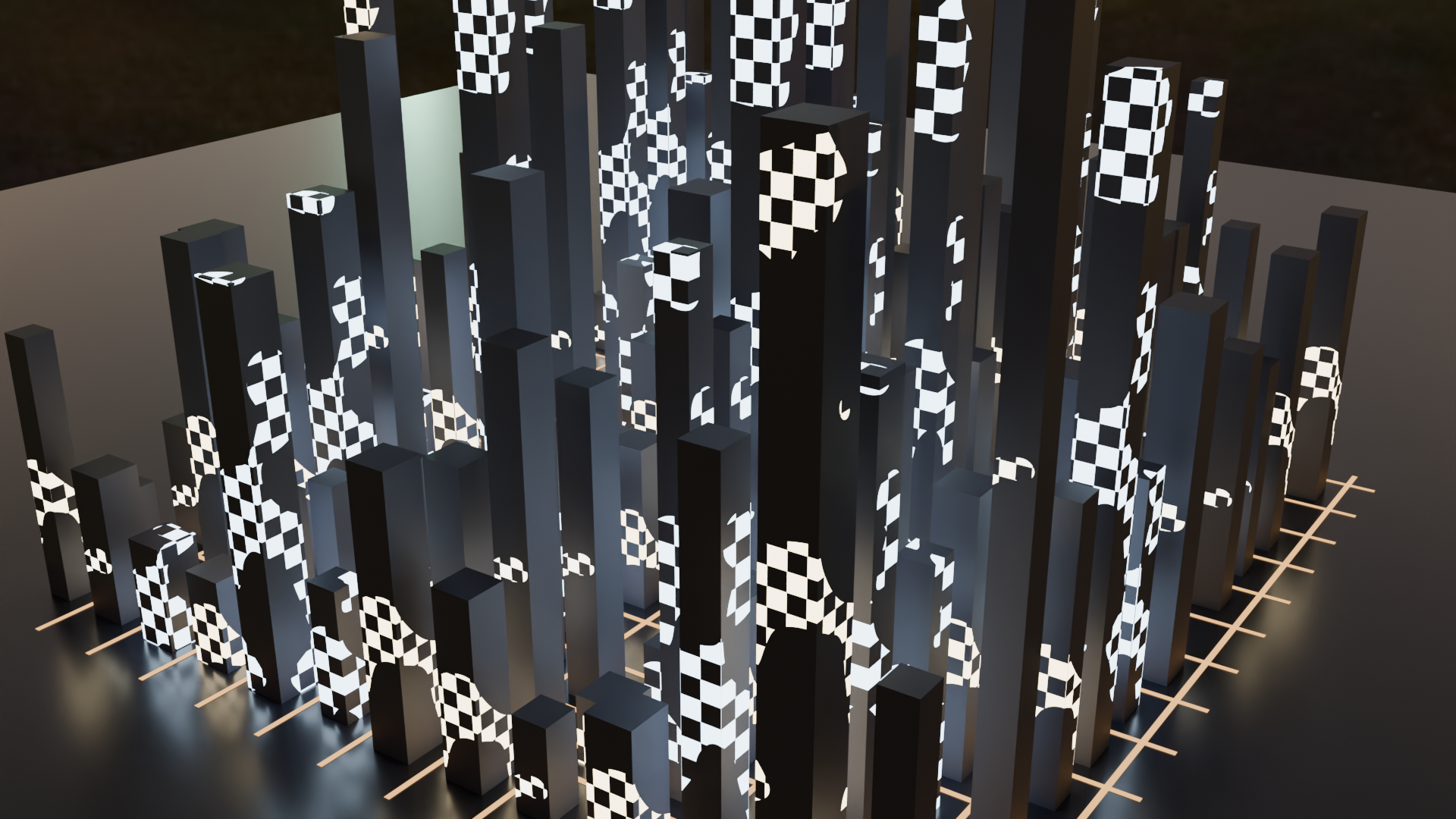
This night city still was rendered on a JANCTION GPU under the night preset. The lit windows come from a single emissive material driven by a checker texture, with three variants for variety, so there are no individual lights to manage. It took 9.6 GPU seconds on the production GPU, 1.0 JPY at 0.1 JPY per GPU-second.
What is in the frame
A block of dark towers with a grid of lit and unlit windows under a night sky. It is a quick establishing shot for a story, a game pitch or a title card.
How the scene is built
The towers are boxes. A checker texture decides which windows glow and feeds the emission strength of one material; three variants of that material break up the pattern. The night preset adds only faint ambient light.
Adapt it
Change the checker scale for denser windows, or add a camera move and render it as an MP4. Emissive light is cheap to render compared with hundreds of lamp objects.
1 JPY for this render. The free welcome credit of a new key covers about 103 of them, with no card.
Render this example with your AI
ChatGPT · Claude · Grok · Perplexity
Use JANCTION Render (MCP server https://render.janction.jp/mcp) to render this example: render_preview(scene_url="https://render.janction.jp/samples/ex07_night_city.py"). Then suggest how to change the colors, shapes and camera for my own subject. Ask me before the final render.
Each link opens the app with the text below filled in (if it is not, copy and paste it). If JANCTION Render is not connected in that app yet, add https://render.janction.jp/mcp as a connector first.
Blender warnings
- environment preset 'night' replaced the scene's world (HDRI lighting)
The script (bpy, runs as is)
ex07_night_city.py. It builds the scene, the camera and the frame range; resolution, samples, denoising and the GPU are set by the service.
"""JANCTION Render example 07: a block of office towers at night with lit windows, under the night preset (one still).

Reproduce: render_final(scene_url="https://render.janction.jp/samples/ex07_night_city.py",
                        width=1920, height=1080, samples=128, environment="night")
The windows are a checker texture driving the emission of one material; three variants give the variety.
"""
import random

import bpy
from mathutils import Matrix, Vector

for ob in list(bpy.data.objects):
    bpy.data.objects.remove(ob, do_unlink=True)
scene = bpy.context.scene
scene.frame_start = 1
scene.frame_end = 1


def material(name, color, roughness=0.5, metallic=0.0, **inputs):
    mat = bpy.data.materials.new(name)
    mat.use_nodes = True
    bsdf = mat.node_tree.nodes["Principled BSDF"]
    bsdf.inputs["Base Color"].default_value = (*color, 1.0)
    bsdf.inputs["Roughness"].default_value = roughness
    bsdf.inputs["Metallic"].default_value = metallic
    for key, value in inputs.items():
        bsdf.inputs[key].default_value = value
    return mat


def add(op, name, mat=None, **kw):
    getattr(bpy.ops.mesh, op)(**kw)
    ob = bpy.context.object
    ob.name = name
    if mat is not None:
        ob.data.materials.append(mat)
    return ob


def look_at(ob, target):
    ob.rotation_euler = (Vector(target) - ob.location).to_track_quat("-Z", "Y").to_euler()


def camera(location, target, lens=50.0):
    data = bpy.data.cameras.new("Camera")
    data.lens = lens
    cam = bpy.data.objects.new("Camera", data)
    scene.collection.objects.link(cam)
    cam.location = location
    look_at(cam, target)
    scene.camera = cam
    return cam


def tower_material(name, scale, warm, lit):
    """Dark facade whose windows glow: a checker (the window grid) times a thresholded noise (which floors are lit)
    drives the emission strength. `lit` is the share of the facade that is lit (0..1)."""
    mat = material(name, (0.05, 0.05, 0.07), roughness=0.6, **{"Emission Color": (*warm, 1.0)})
    nodes = mat.node_tree.nodes
    links = mat.node_tree.links
    bsdf = nodes["Principled BSDF"]
    coord = nodes.new("ShaderNodeTexCoord")
    checker = nodes.new("ShaderNodeTexChecker")
    checker.inputs["Scale"].default_value = scale
    noise = nodes.new("ShaderNodeTexNoise")
    noise.inputs["Scale"].default_value = 0.45
    noise.inputs["Detail"].default_value = 1.0
    ramp = nodes.new("ShaderNodeValToRGB")
    ramp.color_ramp.interpolation = "CONSTANT"
    ramp.color_ramp.elements[0].position = 0.0
    ramp.color_ramp.elements[0].color = (0.0, 0.0, 0.0, 1.0)
    ramp.color_ramp.elements[1].position = 1.0 - lit
    ramp.color_ramp.elements[1].color = (1.0, 1.0, 1.0, 1.0)
    windows = nodes.new("ShaderNodeMath")
    windows.operation = "MULTIPLY"
    gain = nodes.new("ShaderNodeMath")
    gain.operation = "MULTIPLY"
    gain.inputs[1].default_value = 7.0
    links.new(coord.outputs["Object"], checker.inputs["Vector"])
    links.new(coord.outputs["Object"], noise.inputs["Vector"])
    links.new(noise.outputs["Fac"], ramp.inputs["Fac"])
    links.new(checker.outputs["Fac"], windows.inputs[0])
    links.new(ramp.outputs["Color"], windows.inputs[1])
    links.new(windows.outputs["Value"], gain.inputs[0])
    links.new(gain.outputs["Value"], bsdf.inputs["Emission Strength"])
    return mat


rng = random.Random(7)
facades = [tower_material("TowerA", 3.2, (1.0, 0.82, 0.5), 0.45), tower_material("TowerB", 4.0, (0.95, 0.9, 0.7), 0.35),
           tower_material("TowerC", 2.8, (0.6, 0.8, 1.0), 0.5)]
ground = material("Ground", (0.02, 0.02, 0.03), roughness=0.25)
street = material("Street", (0.1, 0.05, 0.02), roughness=0.9,
                  **{"Emission Color": (1.0, 0.5, 0.15, 1.0), "Emission Strength": 2.0})

add("primitive_plane_add", "Ground", ground, size=80)
N = 13
for ix in range(N):
    for iy in range(N):
        if rng.random() < 0.12:
            continue
        h = rng.uniform(1.2, 8.0) if rng.random() < 0.8 else rng.uniform(8.0, 14.0)
        w = rng.uniform(0.6, 0.95)
        x = (ix - (N - 1) / 2) * 1.6 + rng.uniform(-0.1, 0.1)
        y = (iy - (N - 1) / 2) * 1.6 + rng.uniform(-0.1, 0.1)
        tower = add("primitive_cube_add", "Tower_%d_%d" % (ix, iy), rng.choice(facades), size=1, location=(x, y, h / 2))
        # 大きさはメッシュに焼き込む(object の scale で伸ばすと窓の市松が縦に伸びて縞になる)
        tower.data.transform(Matrix.Diagonal((w, w, h, 1.0)))
for i in range(-6, 7):
    strip = add("primitive_plane_add", "StreetX%d" % i, street, size=1, location=(0, i * 1.6 + 0.8, 0.01))
    strip.scale = (22, 0.12, 1)
    strip = add("primitive_plane_add", "StreetY%d" % i, street, size=1, location=(i * 1.6 + 0.8, 0, 0.01))
    strip.scale = (0.12, 22, 1)

camera((18.0, -26.0, 16.0), (0.0, 0.0, 3.0), lens=40)