Updated 2026-10-05
In Windsurf open Cascade → Manage MCPs → Add Server (or edit ~/.codeium/windsurf/mcp_config.json) and add janction-render with serverUrl https://render.janction.jp/mcp. Press Refresh; Cascade then lists the 12 tools and the first call opens the OAuth consent page. Free beta: 10 GPU-minutes per key per day.
// ~/.codeium/windsurf/mcp_config.json
{
  "mcpServers": {
    "janction-render": { "serverUrl": "https://render.janction.jp/mcp" }
  }
}
Remote servers use serverUrl in Windsurf (not url). After saving, click Refresh in Manage MCPs; Windsurf does not reload servers by itself. The first tool call opens the OAuth consent page, which creates a free key. If your Windsurf build asks for a header instead, use "headers": {"Authorization": "Bearer jr_..."} with a key from POST https://render.janction.jp/v1/keys.
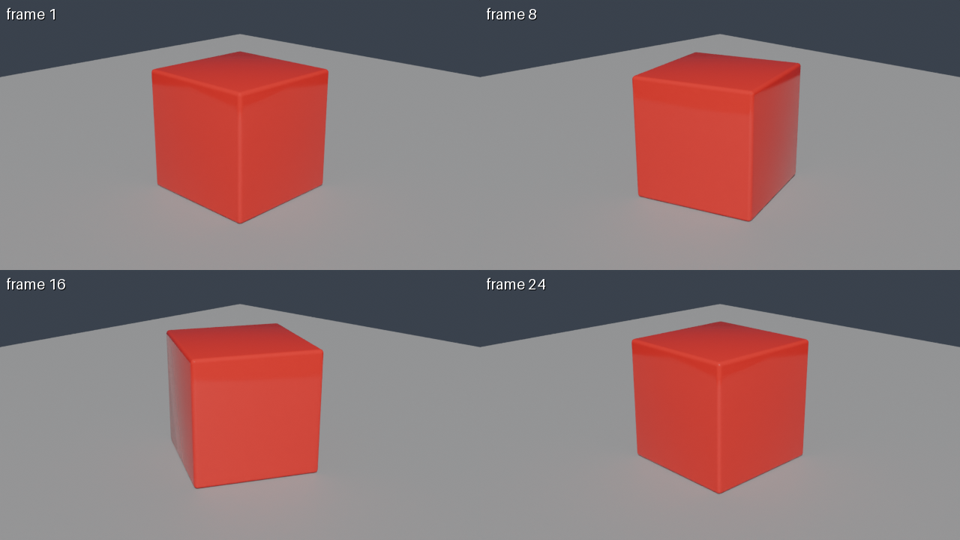
Using JANCTION Render, build a glossy red cube rotating on a grey floor and show me a 4-frame preview.
If it looks right, render 24 frames at 1280x720 as an MP4.
To render a .blend or 3D file that is on your computer, drop it at /upload to get a 12-hour link (no sign-up) and tell the AI "Render this file: <link>". To test the connection first: "Render a preview of https://render.janction.jp/samples/cube_scene.py".
scene_info reads the scene without rendering: cameras, frame range, objects, missing files.render_preview renders 1-4 frames at 720p in a few GPU seconds and returns the image, so the agent can look, fix the script and try again.render_estimate says how long the final render takes ("about 3 minutes") and whether it fits today's free quota.render_final renders the frames on GPUs and joins them into an MP4; render_status reports the remaining time; render_download returns the files or links.| job | GPU time | note |
|---|---|---|
| preview, 4 frames (720p split in 4 tiles, 16 samples, denoised) | about 4 s | round trip about 8 s; the image comes back inline |
| final, 24 frames at 1280x720, 64 samples → MP4 | about 60 s | measured 2026-09-30 / 10-01 (59 s and 58 s) |
| final, one 1920x1080 frame at 128 samples | about 11 s | the estimator's baseline; heavy scenes take longer |
These are individual observations of simple scenes (2026-09-30 to 10-01 UTC, NVIDIA RTX PRO 6000 Blackwell Max-Q Workstation Edition, 96 GB). The 4-GPU-second example used a rotating cube, four 640x360 tiles and 16 samples. GPU time includes Blender startup and scene loading; it is distinct from completion time including queue and transfers. See conditions, round trips and reproduction files. These are not speed guarantees.
render_estimate gives the number before rendering; once a scene has been rendered once, the estimate uses that scene's own measurement.
serverUrl.quota_exceeded / beta_limit: see the limits below.Delete the entry from mcp_config.json (or the server in Manage MCPs) and press Refresh. Revoke the key with POST https://render.janction.jp/v1/keys/revoke if needed.
Free beta (as of 2026-10-01): 10 GPU-minutes per key per day (20 per network), final renders up to 240 frames at 1080p. Quotas reset at 00:00 UTC (09:00 JST). New jobs exceeding the quota are rejected with HTTP 429 quota_exceeded and resets_at; they are not queued for the next day. Resubmit after the quota resets. No sign-up: connecting creates a key. Inputs and results are deleted 24 hours after last use and never used for training. Paid plans will be announced on this site and in llms.txt before they start.
Windsurf only reloads MCP servers when you press Refresh in Manage MCPs. Also check the key is serverUrl for a remote server.
Not yet. Paste the mcp_config.json entry above; it is one line.
Through the remote server it can pass an https URL or a bpy script. For local files let Cascade run the CLI: pip install janction-render, then janction-render render scene.blend --wait.
JANCTION Render v0.4.17 · JasmyLab Inc. · Updated 2026-10-05 · Tested with Blender 5.0, JANCTION Render 0.4.17 · 日本語