第 8 号 環境
アイソメの島のジオラマ(平行投影カメラ)
等角投影の小さな島のジオラマ。
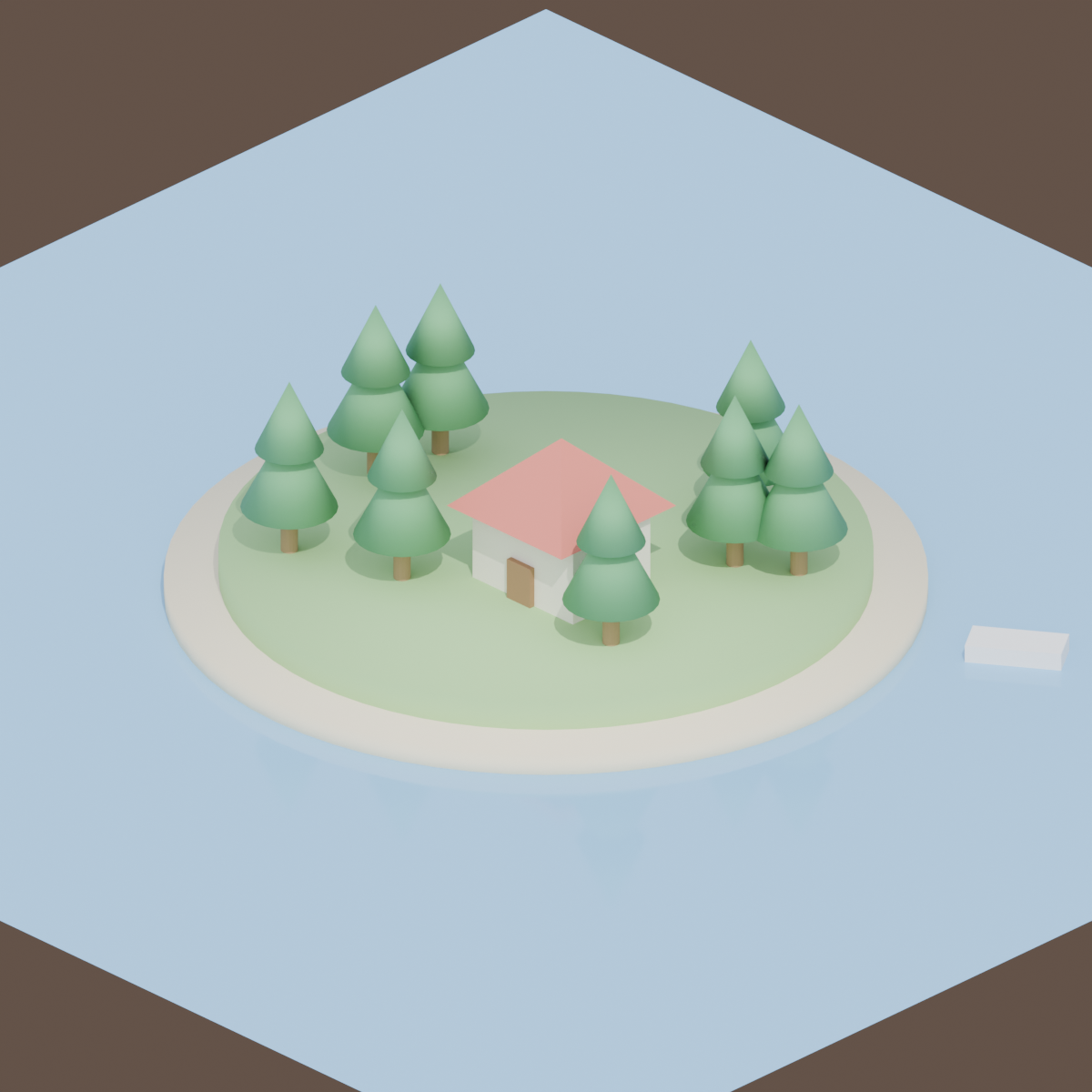
Cycles1200 × 1200サンプル 128PNG
本番の GPU で描いた本物の結果と、そのまま動く bpy スクリプト、設定、GPU 秒。スクリプトの URL を scene_url に渡せば同じものが出ます。本番の GPU で 4.7 GPU 秒、0.1 円/GPU 秒で 0.5 円。
写っているもの
淡い水に浮かぶ丸い芝の島に、ローポリの木と小さな家。等角投影のジオラマは、ゲームの絵・アプリの挿絵・解説図でよく使われます。
シーンの組み方
カメラは平行投影なので、平行な線は平行のまま、遠くの物も小さくなりません。ortho_scale で切り取りを決めます。overcast のプリセットで影を柔らかくし、形をはっきり見せます。
自分用に変える
小物を足す・季節を変えると AI に頼み、カメラはそのまま。シリーズが一枚ずつ揃います。
0.5 円 でこの 1 枚。新しい鍵の無料のようこそクレジットなら、カード無しで約 214 回分。
この作例を自分の AI で描く
ChatGPT · Claude · Grok · Perplexity
JANCTION Render(MCP サーバー https://render.janction.jp/mcp)で、この作例を描いて: render_preview(scene_url="https://render.janction.jp/samples/ex08_isometric_island.py")。そのあと、私の題材に合わせて色・形・カメラを変える案を出して。仕上げの前に確認して。
リンクを押すと、下の文が入った状態でそのアプリが開きます(入らないときは写して貼ってください)。そのアプリに JANCTION Render をまだつないでいなければ、先にコネクタとして https://render.janction.jp/mcp を足してください。
Blender の警告
- environment preset 'overcast' replaced the scene's world (HDRI lighting)
スクリプト(bpy、そのまま動く)
ex08_isometric_island.py。シーン・カメラ・コマ範囲だけを組み、解像度・サンプル・ノイズ除去・GPU はサービスが決めます。
"""JANCTION Render example 08: an isometric island diorama with an orthographic camera (one square still).

Reproduce: render_final(scene_url="https://render.janction.jp/samples/ex08_isometric_island.py",
                        width=1200, height=1200, samples=128, environment="overcast")
The camera is orthographic (cam.data.type = "ORTHO"); ortho_scale sets how much of the island is in view.
"""
import math
import random

import bpy
from mathutils import Vector

for ob in list(bpy.data.objects):
    bpy.data.objects.remove(ob, do_unlink=True)
scene = bpy.context.scene
scene.frame_start = 1
scene.frame_end = 1


def material(name, color, roughness=0.5, metallic=0.0, **inputs):
    mat = bpy.data.materials.new(name)
    mat.use_nodes = True
    bsdf = mat.node_tree.nodes["Principled BSDF"]
    bsdf.inputs["Base Color"].default_value = (*color, 1.0)
    bsdf.inputs["Roughness"].default_value = roughness
    bsdf.inputs["Metallic"].default_value = metallic
    for key, value in inputs.items():
        bsdf.inputs[key].default_value = value
    return mat


def smooth(ob):
    for p in ob.data.polygons:
        p.use_smooth = True
    return ob


def add(op, name, mat=None, **kw):
    getattr(bpy.ops.mesh, op)(**kw)
    ob = bpy.context.object
    ob.name = name
    if mat is not None:
        ob.data.materials.append(mat)
    return ob


def look_at(ob, target):
    ob.rotation_euler = (Vector(target) - ob.location).to_track_quat("-Z", "Y").to_euler()


def light(name, kind, location, energy, target=None, size=1.0, color=(1.0, 1.0, 1.0)):
    data = bpy.data.lights.new(name, kind)
    data.energy = energy
    data.color = color
    if kind == "AREA":
        data.size = size
    ob = bpy.data.objects.new(name, data)
    scene.collection.objects.link(ob)
    ob.location = location
    if target is not None:
        look_at(ob, target)
    return ob


water = material("Water", (0.25, 0.55, 0.85), roughness=0.08)
sand = material("Sand", (0.88, 0.8, 0.58), roughness=0.9)
grass = material("Grass", (0.36, 0.62, 0.26), roughness=0.9)
trunk = material("Trunk", (0.4, 0.26, 0.14), roughness=0.9)
leaves = material("Leaves", (0.15, 0.45, 0.2), roughness=0.8)
walls = material("Walls", (0.95, 0.9, 0.8), roughness=0.8)
roof = material("Roof", (0.75, 0.2, 0.15), roughness=0.7)
door = material("Door", (0.35, 0.2, 0.1), roughness=0.8)
boat = material("Boat", (0.9, 0.9, 0.9), roughness=0.6)

add("primitive_plane_add", "Water", water, size=16, location=(0, 0, 0.1))
shore = add("primitive_cylinder_add", "Shore", sand, radius=3.5, depth=0.3, vertices=64, location=(0, 0, 0.15))
smooth(shore)
island = add("primitive_cylinder_add", "Island", grass, radius=3.0, depth=0.6, vertices=64, location=(0, 0, 0.3))
smooth(island)

rng = random.Random(11)
for i in range(8):
    a = rng.uniform(0, 2 * math.pi)
    r = rng.uniform(1.4, 2.6)
    x, y = r * math.cos(a), r * math.sin(a)
    if abs(x - 0.6) < 1.1 and abs(y + 0.4) < 1.0:
        continue
    add("primitive_cylinder_add", "Trunk%d" % i, trunk, radius=0.08, depth=0.6, vertices=16, location=(x, y, 0.9))
    cone = add("primitive_cone_add", "Leaves%d" % i, leaves, vertices=24, radius1=0.45, depth=0.9, location=(x, y, 1.5))
    smooth(cone)
    cone = add("primitive_cone_add", "LeavesTop%d" % i, leaves, vertices=24, radius1=0.32, depth=0.7, location=(x, y, 2.0))
    smooth(cone)

house = add("primitive_cube_add", "House", walls, size=1, location=(0.6, -0.4, 1.0))
house.scale = (1.3, 1.0, 0.8)
top = add("primitive_cone_add", "Roof", roof, vertices=4, radius1=1.05, depth=0.7, location=(0.6, -0.4, 1.75),
          rotation=(0, 0, math.pi / 4))
front = add("primitive_cube_add", "Door", door, size=1, location=(0.6, -0.93, 0.8))
front.scale = (0.3, 0.06, 0.4)
dinghy = add("primitive_cube_add", "Boat", boat, size=1, location=(3.9, 2.2, 0.17), rotation=(0, 0, 0.6))
dinghy.scale = (0.9, 0.4, 0.2)

light("Sun", "SUN", (6.0, -4.0, 9.0), 3.0, target=(0, 0, 0.5), color=(1.0, 0.97, 0.9))

data = bpy.data.cameras.new("Camera")
data.type = "ORTHO"
data.ortho_scale = 10.0
cam = bpy.data.objects.new("Camera", data)
scene.collection.objects.link(cam)
cam.location = (10.0, -10.0, 8.2)
look_at(cam, (0.0, 0.0, 0.6))
scene.camera = cam