Updated 2026-10-05
Upload the 3D file (or give an https URL) to JANCTION Render. It is imported into an empty Blender 5.0 scene, framed by an automatic camera, lit by a sun or an HDRI preset (environment='studio' and others), previewed in a few GPU seconds, and rendered as frames or an MP4; orbit=true gives a turntable. A .gltf or .obj brings its .bin, .mtl and textures from the same folder or URL folder.
Turntable. orbit=true makes a camera circle the scene once (default 24 frames): a preview shows four angles, a final render gives the whole turn as an MP4. Handy for an imported model.
render_final(orbit=true) from a bpy script: 76 GPU seconds on JANCTION Render, 2026-10-01.Inputs: a .blend (send external images along, or pack them: File → External Data → Pack Resources), a bpy Python script
(no local Blender needed; set the scene, camera and frame range only, the service sets engine, resolution and samples), or a
3D file (glTF/GLB, FBX, USD, OBJ, STL, PLY, Alembic, imported into an empty scene). A scene without a camera or light gets an automatic
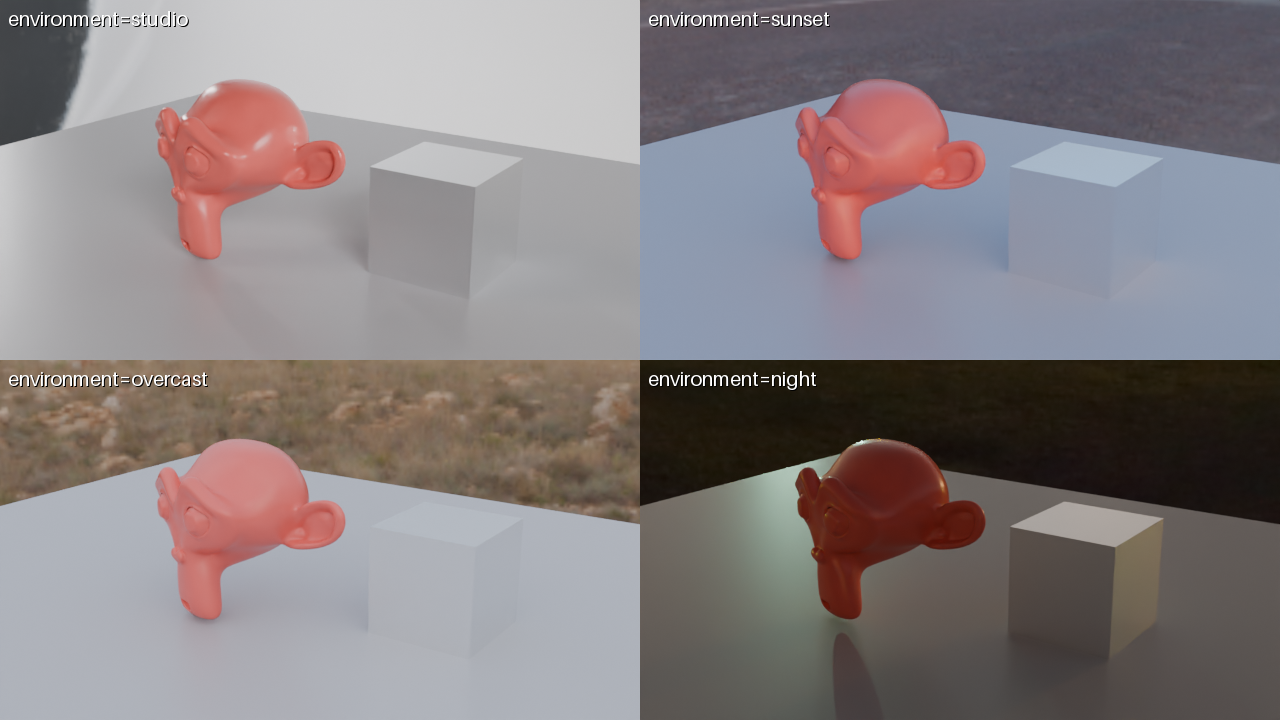
one and the response says so under warnings. environment = studio / sunset / overcast / night lights the scene with a bundled HDRI; a preview with environment="compare" shows the same frame under all four presets in one labelled image.
render_preview(scene_url="https://example.com/models/chair.glb", environment="studio")
render_preview(scene_url="https://example.com/models/chair.glb", environment="compare")   # 4 presets in one image
render_final(scene_id="<from the preview>", orbit=true, orbit_frames=48, width=1280, height=720, output="mp4")
Or let the agent find a model first: asset_search("wooden chair", kind="models") returns CC0 Poly Haven models; pass polyhaven:<id> in asset_urls.
pip install janction-render
export JANCTION_RENDER_SERVER=https://render.janction.jp
janction-render preview chair.glb --environment studio
janction-render render chair.glb --orbit --frames 1-48 --size 1280x720 --wait
curl -X POST https://render.janction.jp/v1/files -H "X-API-Key: $K" -F [email protected]
# textures for FBX / OBJ: POST /v1/files/{scene_id}/assets with the image files
curl -X POST https://render.janction.jp/v1/jobs -H "X-API-Key: $K" -H "Content-Type: application/json" \
  -d '{"scene_id":"<id>","kind":"preview","frames":"1-4","environment":"studio"}'
orbit_target and orbit_distance adjust the shot.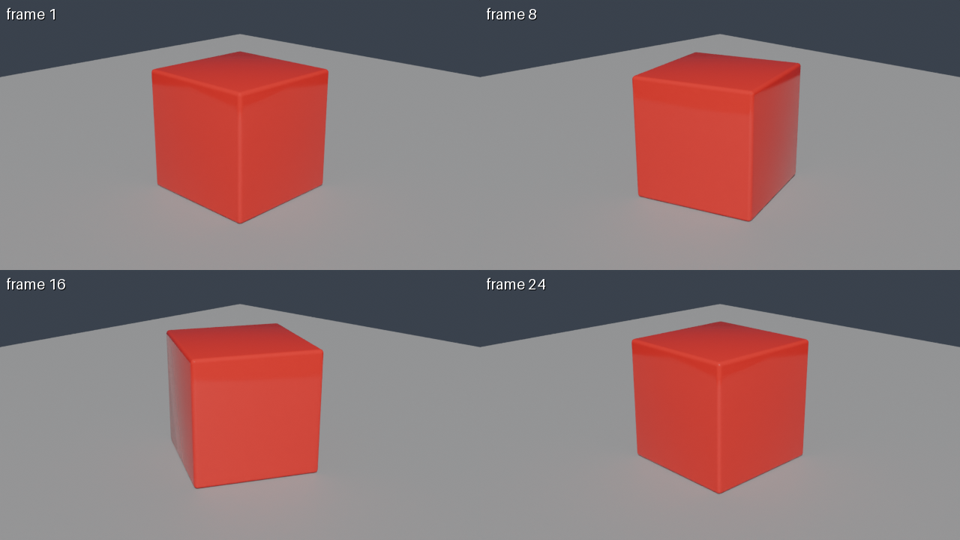
| job | GPU time | note |
|---|---|---|
| preview, 4 frames (720p split in 4 tiles, 16 samples, denoised) | about 4 s | round trip about 8 s; the image comes back inline |
| final, 24 frames at 1280x720, 64 samples → MP4 | about 60 s | measured 2026-09-30 / 10-01 (59 s and 58 s) |
| final, one 1920x1080 frame at 128 samples | about 11 s | the estimator's baseline; heavy scenes take longer |
These are individual observations of simple scenes (2026-09-30 to 10-01 UTC, NVIDIA RTX PRO 6000 Blackwell Max-Q Workstation Edition, 96 GB). The 4-GPU-second example used a rotating cube, four 640x360 tiles and 16 samples. GPU time includes Blender startup and scene loading; it is distinct from completion time including queue and transfers. See conditions, round trips and reproduction files. These are not speed guarantees.
render_estimate gives the number before rendering; once a scene has been rendered once, the estimate uses that scene's own measurement.
| from | how |
|---|---|
| A file on this computer (.blend, 3D file) | Drop it at /upload to get a 12-hour link (no sign-up), then tell the AI "Render this file: <link>". From inside Blender use the add-on; from a terminal the CLI uploads directly |
| Claude.ai (web / desktop / mobile) | Settings → Connectors → Add custom connector → https://render.janction.jp/mcp. "Connect" opens a page that creates a free key |
| ChatGPT | Settings → Connectors → Advanced → Developer mode → Create → https://render.janction.jp/mcp (OAuth) |
| Claude Code | claude mcp add --transport http janction-render https://render.janction.jp/mcp, then /mcp to authenticate |
| Codex | codex mcp add janction-render --url https://render.janction.jp/mcp |
| Cursor / VS Code | Add to Cursor Add to VS Code The button opens the editor; confirm and it is added. Manual: Streamable HTTP at https://render.janction.jp/mcp |
| Gemini CLI / Antigravity CLI | gemini extensions install https://github.com/JasmyLab-JANCTION/janction-render |
| Grok / Perplexity / Le Chat | Add a custom (remote MCP) connector with https://render.janction.jp/mcp in each app's Connectors settings (Grok: New Connector → Custom; Perplexity: Pro / Max / Enterprise; Le Chat: workspace admin) |
| Windsurf, Cline, Goose, other MCP clients | Streamable HTTP at https://render.janction.jp/mcp; OAuth or Authorization: Bearer <api key> |
| Terminal (stdio, sends local files) | claude mcp add janction-render -e JANCTION_RENDER_SERVER=https://render.janction.jp -- uvx --from janction-render janction-render-mcp |
| Inside Blender (for people) | The add-on; extension repository https://render.janction.jp/extensions/index.json. Maya / Houdini / Cinema 4D: submit tools |
Free beta (as of 2026-10-01): 10 GPU-minutes per key per day (20 per network), final renders up to 240 frames at 1080p. Quotas reset at 00:00 UTC (09:00 JST). New jobs exceeding the quota are rejected with HTTP 429 quota_exceeded and resets_at; they are not queued for the next day. Resubmit after the quota resets. No sign-up: connecting creates a key. Inputs and results are deleted 24 hours after last use and never used for training. Paid plans will be announced on this site and in llms.txt before they start.
glTF/GLB, FBX, USD/USDA/USDC/USDZ, OBJ, STL, PLY and Alembic are imported into an empty Blender 5.0 scene on the GPU server; nothing runs on your machine.
A .gltf or .obj pulls its .bin, .mtl and textures from the same folder or URL folder. For FBX, send the image files as assets (POST /v1/files/{id}/assets or asset_urls).
Yes: orbit=true on render_final (default 24 frames; set orbit_frames). A preview with orbit=true shows 0, 90, 180 and 270 degrees in one image.
JANCTION Render v0.4.17 · JasmyLab Inc. · Updated 2026-10-05 · Tested with Blender 5.0, JANCTION Render 0.4.17 · 日本語