In DeepSeek Harness, register one @deepseek-ai/dsh-mcp-client entry with transport streamable-http, url https://render.janction.jp/mcp and an Authorization: Bearer header holding a JANCTION Render key (POST /v1/keys, no sign-up). The tools appear as mcp__janction__render_preview, mcp__janction__render_final and so on: DeepSeek writes the bpy script, previews it on a JANCTION GPU, fixes the scene and renders the MP4. From the DeepSeek API the same tools work through OpenAI-style function calling with the bridge script below. The DeepSeek web and mobile chat cannot add third-party MCP servers as of 2026-10-19; there, let DeepSeek write the script and paste it at /start. Each new key starts with a welcome credit of up to 500 JPY (100 JPY with no card, 400 JPY more after registering a card, which is not charged) (14 days); after that, previews stay free up to 2 GPU-minutes a day and finals cost 0.1 JPY per GPU-second.
Updated 2026-10-19
What it does From an AI app over MCP: the bpy script the AI wrote, or your own .blend or 3D file, rendered on a cloud GPU. Preview, fix, estimate, then the final. The price is shown before rendering, and a paid render starts only after you approve it. Without a connector, let the AI write the script and paste it at /start.
What it does not do Not a tool for editing 3D inside that app (a local Blender is driven by a separate MCP such as blender-mcp). Until it is connected and authenticated, the AI cannot render.
Paste your AI's script and tryTry your own file for free
Browser only; no connector or CLI needed. A 100 JPY welcome credit for a new key (14 days, no card; one per network every 30 days, further keys on the same network share what is left), and 400 JPY more for saving a card that is not charged (once per card); after that, previews stay free up to 2 GPU-minutes a day and finals cost 0.1 JPY per GPU-second.
| DeepSeek | How JANCTION Render connects | Checked |
|---|---|---|
DeepSeek Harness (dsh, the agent harness) | Remote MCP through the official @deepseek-ai/dsh-mcp-client plugin (streamable-http + Bearer key). Setup below. | On 2026-10-19 we ran dsh 0.2.1-rc.2 with dsh-mcp-client 0.2.1-rc.2 against a local copy of this server: it connected with the Bearer header over the 2026-07-28 MCP revision, called server/discover and tools/list, and received the 12 tools. The instructions stay under the client's 32 KiB limit and every tool name fits the mcp__janction__… form. Not yet: a render driven from inside dsh by a DeepSeek model (dsh needs a DeepSeek API key for that). We will update this line when one is recorded. |
DeepSeek API (api.deepseek.com, OpenAI-compatible) | Function calling: the bridge script lists the MCP tools, hands them to deepseek-flash as functions and runs the tool loop. | Tool schemas convert without loss (tested in CI). A live loop needs your DeepSeek key. |
| DeepSeek web / app chat | No third-party MCP servers or custom connectors as of 2026-10-19 (no public documentation says otherwise). Use the no-connector path: DeepSeek writes the bpy script, you paste it at /start. | Works today; the browser does the rendering call. |
JANCTION Render is not affiliated with DeepSeek and is not listed in any DeepSeek directory. This page describes a client configuration you own.
1. Get a key (temporary, no sign-up; it starts with the welcome credit) and keep it in an environment variable. The dsh client sends static headers only, so OAuth is not used here:
curl -s -X POST https://render.janction.jp/v1/keys -H 'Content-Type: application/json' -d '{"label": "deepseek-harness", "found_via": "deepseek"}'
# → {"api_key": "jr_…", …}
export JANCTION_RENDER_API_KEY=jr_…
2. Install the MCP client plugin pinned to your dsh version (the client's npm latest tag still points at 0.0.1-rc.1, so pin it: @0.2.1-rc.2 for dsh 0.2.1-rc.2), then add one entry to the patch file of the profile you use, ~/.dsh/profiles/<profile>/cordis.patch.yml ($DSH_HOME defaults to ~/.dsh; dsh writes the empty file on first start). For a one-off try, keep the entry in its own file and pass it with --patch instead (step 3):
dsh --version
dsh plugin --profile web add @deepseek-ai/dsh-mcp-client@<your dsh version>
- insert:
    - id: mcp-janction
      name: '@deepseek-ai/dsh-mcp-client'
      config:
        serverName: janction
        transport: streamable-http
        url: https://render.janction.jp/mcp?src=deepseek-harness
        headers:
          Authorization: !!js '`Bearer ${process.env.JANCTION_RENDER_API_KEY}`'
        toolCallTimeoutMs: 60000
        failOnStartupError: true
3. Check that the entry merged, then start (or restart) the harness:
dsh --profile web --dump-config | grep mcp-
dsh web
# one-off, without editing the profile:
dsh --profile web --patch janction.yml --no-open
The tools are named mcp__janction__scene_info, mcp__janction__render_preview, mcp__janction__render_estimate, mcp__janction__render_final, mcp__janction__render_status, mcp__janction__render_download and the rest of the 12. Keep url and headers only in this entry: mixing them with stdio fields (command, args) is a schema error. The ?src=deepseek-harness suffix only tags the key's origin in our ledger; drop it if you prefer.
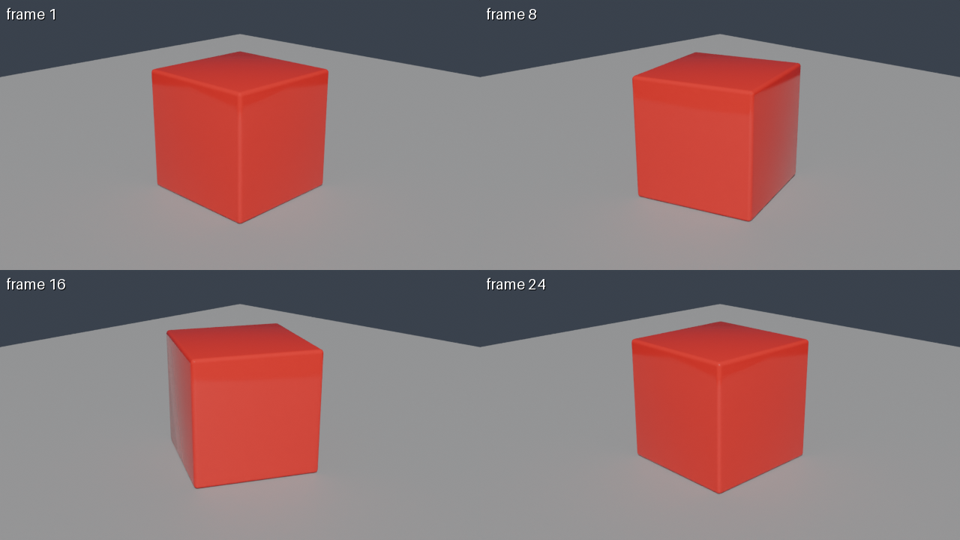
Using JANCTION Render, build a glossy red cube rotating on a grey floor and show me a 4-frame preview.
If it looks right, render 24 frames at 1280x720 as an MP4.
To render a .blend or 3D file that is on your computer, drop it at /upload to get a 12-hour link (no sign-up) and tell the AI "Render this file: <link>". To test the connection first: "Render a preview of https://render.janction.jp/samples/cube_scene.py".
scene_info reads the scene without rendering: cameras, frame range, objects, missing files.render_preview renders 1-4 frames at 720p in a few GPU seconds and returns the image, so the agent can look, fix the script and try again.render_estimate says how long the final render takes ("about 3 minutes") and whether it fits the free GPU time left (the welcome credit while it lasts, then up to 2 preview GPU-minutes a day).render_final renders the frames on GPUs and joins them into an MP4; render_status reports the remaining time; render_download returns the files or links.The API is OpenAI-compatible, so the MCP tools become tools=[{"type": "function", …}]. The bridge script in the public repository does the whole loop: tools/list from the MCP server, the schema conversion, the chat turns with deepseek-flash, and tools/call for each function the model picks. Paid tools (render_final) are only called after the model has shown the estimate and you answered yes in the chat.
pip install requests
export DEEPSEEK_API_KEY=sk-…
export JANCTION_RENDER_API_KEY=jr_…
python examples/deepseek_tool_calling.py --dry-run     # lists the tools as DeepSeek will see them (no DeepSeek call)
python examples/deepseek_tool_calling.py "Preview https://render.janction.jp/samples/cube_scene.py at 720p and tell me what the critic said"
Under the hood the first turn looks like this (nothing DeepSeek-specific beyond the base URL and the model name):
POST https://api.deepseek.com/chat/completions
{"model": "deepseek-flash",
 "messages": [{"role": "user", "content": "Render a turntable of …"}],
 "tools": [{"type": "function", "function": {"name": "render_preview", "description": "…",
             "parameters": {"type": "object", "properties": {"scene_url": {"type": "string"}, …}}}}, …]}
| job | GPU time | note |
|---|---|---|
| preview, 4 frames (720p split in 4 tiles, 16 samples, denoised) | about 4 s | round trip about 8 s; the image comes back inline |
| final, 24 frames at 1280x720, 64 samples → MP4 | about 60 s | measured 2026-09-30 / 10-01 (59 s and 58 s) |
| final, one 1920x1080 frame at 128 samples | about 11 s | the estimator's baseline; heavy scenes take longer |
These are individual observations of simple scenes (2026-09-30 to 10-01 UTC, NVIDIA RTX PRO 6000 Blackwell Max-Q Workstation Edition, 96 GB). The 4-GPU-second example used a rotating cube, four 640x360 tiles and 16 samples. GPU time includes Blender startup and scene loading; it is distinct from completion time including queue and transfers. See conditions, round trips and reproduction files. These are not speed guarantees.
render_estimate gives the number before rendering; once a scene has been rendered once, the estimate uses that scene's own measurement.
mcp__janction__ tools: the server replied 401. Check that JANCTION_RENDER_API_KEY is set in the shell that starts dsh and that the YAML uses !!js so the header is built from the variable. A revoked key also gives 401; create a new one.dsh web refuses to start after adding the entry: the plugin was not installed first, or serverName / id is already used by another entry.402 payment_required in a tool result: the final would go past the free GPU time left; the result carries checkout_url and the estimate. A paid final starts only after you confirm (confirm_with / max_yen).render_status or render_download again instead of raising toolCallTimeoutMs; render_download waits up to 45 s per call by itself.render_final without asking: keep the bridge script's confirmation step, or drop render_final from the tool list for unattended runs.Delete the mcp-janction entry from the profile patch (dsh hot-reloads it). Revoke the key with POST https://render.janction.jp/v1/keys/revoke if you want it gone too.
Pricing (since 2026-10-08): Each new key gets 100 JPY of GPU time free with no card (1,000 GPU-seconds, 14 days) for previews and finals, and 400 JPY more once a card is saved on a Stripe page that charges nothing (once per card): up to 500 JPY in all. After it is used up or expires, previews are free up to 2 GPU-minutes per key per day and final renders are paid from prepaid credit at 0.1 JPY per GPU-second. Top-ups (paid) start at 500 JPY. The first top-up during the 14-day welcome period counts 1.5x, with the bonus capped at 500 JPY (500 JPY buys 750 JPY of credit). Top-ups of 2,000 JPY or more get 10 to 20% extra (not combined with the first-top-up bonus; the larger one applies). Top-up bonuses are separate from the welcome credit and the card-saving credit. Payment is on a Stripe Checkout page. One full welcome credit per network every 30 days; further keys from the same network use what is left of that network's credit. A job without enough credit gets HTTP 402 payment_required with a checkout_url. Final renders go up to 3,000 frames per instruction (run as parts of 240 under one job id), 1080p (1920x1080) on free time and up to 4K (3840x2160) on prepaid credit. The free preview time resets at 00:00 UTC (09:00 JST). No sign-up: connecting creates a key. Inputs and results are deleted 24 hours after last use (normally 7 days for keys that have paid 500 JPY or more in total) and never used for training.
If you cannot add a connector to your AI (plan or administrator settings), the same result is one step away: send the prompt below to the AI and paste the code it returns into the paste-and-render page. The preview needs no payment.
Write a Blender 5.0 bpy script that builds <describe your scene here>. Add a camera and set scene.camera, and add one light. Do not call render and do not change render settings. Reply with the code only.
To fix something, give the AI the preview's notes (too dark, cut off, no light) and paste the rewritten script again.
Not as of 2026-10-19: the DeepSeek web and mobile chat have no setting for third-party MCP servers or custom connectors. Ask DeepSeek for the bpy script there and paste it at /start, or use DeepSeek Harness or the API, which can call the MCP server.
The official dsh-mcp-client sends static headers only, so use Authorization: Bearer with a key from POST /v1/keys (kept in an environment variable). OAuth stays available for clients that support it.
deepseek-flash (DeepSeek-V4.1-Flash) is the default in the bridge script because it supports function calling at the lowest price; deepseek-v4-pro works with the same code. The model choice does not change what JANCTION Render renders.
No. There is no partnership, no listing and no endorsement. This page documents a configuration of DeepSeek's public tools that you set up yourself.
On 2026-10-19 we ran dsh 0.2.1-rc.2 with dsh-mcp-client 0.2.1-rc.2 against a local copy of this server: it connected with the Bearer key over the 2026-07-28 revision, called server/discover and tools/list and received the 12 tools. The instructions stay under the client's 32 KiB cap, the names fit the mcp__janction__ form, and the schemas convert to DeepSeek function definitions without loss. A render driven by a DeepSeek model from inside dsh is not yet recorded.
JANCTION Render v0.4.147 · JasmyLab Inc. · Updated 2026-10-19 · Tested with Blender 3.6 / 4.2 / 4.5 / 5.0 / 5.2, JANCTION Render 0.4.147 · 日本語