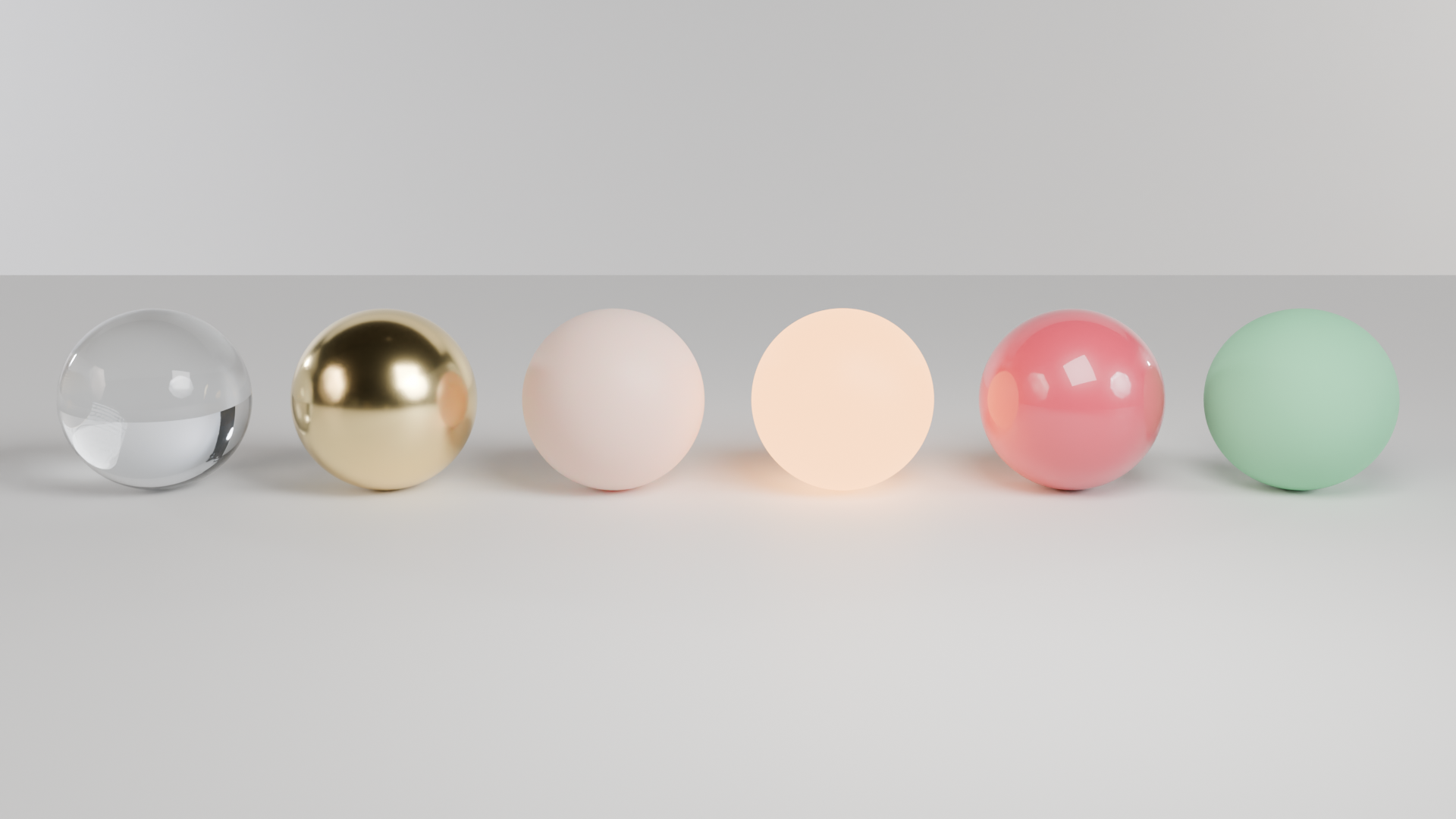
質感の球 6 つ: ガラス・金・肌・発光・車の塗装・プラスチック。本番の GPU で描いた本物の結果と、そのまま動く bpy スクリプト、設定、GPU 秒。スクリプトの URL を scene_url に渡せば同じものが出ます。
| 頼んだ文 | https://render.janction.jp/samples/ex05_material_balls.py を studio プリセット、1920x1080、128 サンプルで描いて。 |
|---|---|
| MCP の呼び出し | render_final(scene_url="https://render.janction.jp/samples/ex05_material_balls.py", frame_start=1, frame_end=1, samples=128, output="png", width=1920, height=1080, environment="studio") |
| GPU 秒 / 往復 | 7.0 s / 8 s |
| 料金の目安(予定単価) | 0.7 JPY (ベータ中は 0 円) |
| 描いた日 | 2026-10-07 |
| Blender | 5.0 |
| frame_start | 1 |
|---|---|
| frame_end | 1 |
| samples | 128 |
| denoise | True |
| output | png |
| width | 1920 |
| height | 1080 |
| environment | studio |
ex05_material_balls.py。シーン・カメラ・コマ範囲だけを組み、解像度・サンプル・ノイズ除去・GPU はサービスが決めます。
"""JANCTION Render example 05: six material balls (glass, gold, skin, emission, car paint, plastic) under the studio preset.

Reproduce: render_final(scene_url="https://render.janction.jp/samples/ex05_material_balls.py",
                        width=1920, height=1080, samples=128, environment="studio")
Each ball is one Principled BSDF with a few inputs changed; copy the one you need.
"""
import bpy
from mathutils import Vector

for ob in list(bpy.data.objects):
    bpy.data.objects.remove(ob, do_unlink=True)
scene = bpy.context.scene
scene.frame_start = 1
scene.frame_end = 1


def material(name, color, roughness=0.5, metallic=0.0, **inputs):
    mat = bpy.data.materials.new(name)
    mat.use_nodes = True
    bsdf = mat.node_tree.nodes["Principled BSDF"]
    bsdf.inputs["Base Color"].default_value = (*color, 1.0)
    bsdf.inputs["Roughness"].default_value = roughness
    bsdf.inputs["Metallic"].default_value = metallic
    for key, value in inputs.items():
        bsdf.inputs[key].default_value = value
    return mat


def smooth(ob):
    for p in ob.data.polygons:
        p.use_smooth = True
    return ob


def add(op, name, mat=None, **kw):
    getattr(bpy.ops.mesh, op)(**kw)
    ob = bpy.context.object
    ob.name = name
    if mat is not None:
        ob.data.materials.append(mat)
    return ob


def look_at(ob, target):
    ob.rotation_euler = (Vector(target) - ob.location).to_track_quat("-Z", "Y").to_euler()


def camera(location, target, lens=50.0):
    data = bpy.data.cameras.new("Camera")
    data.lens = lens
    cam = bpy.data.objects.new("Camera", data)
    scene.collection.objects.link(cam)
    cam.location = location
    look_at(cam, target)
    scene.camera = cam
    return cam


def light(name, kind, location, energy, target=None, size=1.0, color=(1.0, 1.0, 1.0)):
    data = bpy.data.lights.new(name, kind)
    data.energy = energy
    data.color = color
    if kind == "AREA":
        data.size = size
    ob = bpy.data.objects.new(name, data)
    scene.collection.objects.link(ob)
    ob.location = location
    if target is not None:
        look_at(ob, target)
    return ob


balls = [
    ("Glass", material("Glass", (0.95, 0.98, 1.0), roughness=0.02, **{"Transmission Weight": 1.0, "IOR": 1.45})),
    ("Gold", material("Gold", (1.0, 0.78, 0.35), roughness=0.18, metallic=1.0)),
    ("Skin", material("Skin", (0.86, 0.62, 0.52), roughness=0.5,
                      **{"Subsurface Weight": 1.0, "Subsurface Radius": (1.0, 0.2, 0.1), "Subsurface Scale": 0.3})),
    ("Emission", material("Emission", (0.0, 0.0, 0.0), roughness=0.5,
                          **{"Emission Color": (1.0, 0.42, 0.12, 1.0), "Emission Strength": 6.0})),
    ("CarPaint", material("CarPaint", (0.62, 0.04, 0.08), roughness=0.38,
                          **{"Coat Weight": 1.0, "Coat Roughness": 0.03})),
    ("Plastic", material("Plastic", (0.2, 0.6, 0.32), roughness=0.75)),
]
floor = material("Floor", (0.8, 0.8, 0.78), roughness=0.55)
add("primitive_plane_add", "Floor", floor, size=30)
for i, (name, mat) in enumerate(balls):
    ball = add("primitive_uv_sphere_add", name, mat, radius=0.62, segments=96, ring_count=48,
               location=(-3.9 + i * 1.56, 0.0, 0.62))
    smooth(ball)

light("Key", "AREA", (2.0, -4.0, 4.5), 500, target=(0, 0, 0.6), size=3.0)
camera((0.0, -9.5, 2.4), (0.0, 0.0, 0.55), lens=35)
JANCTION Render v0.4.20 · JasmyLab Inc. · 更新 2026-10-07 · 検証 Blender 5.0, JANCTION Render 0.4.20 · English