第 4 号 インテリア
プリミティブだけのリビング
基本形だけで組んだリビング。窓からの光と柔らかい影。
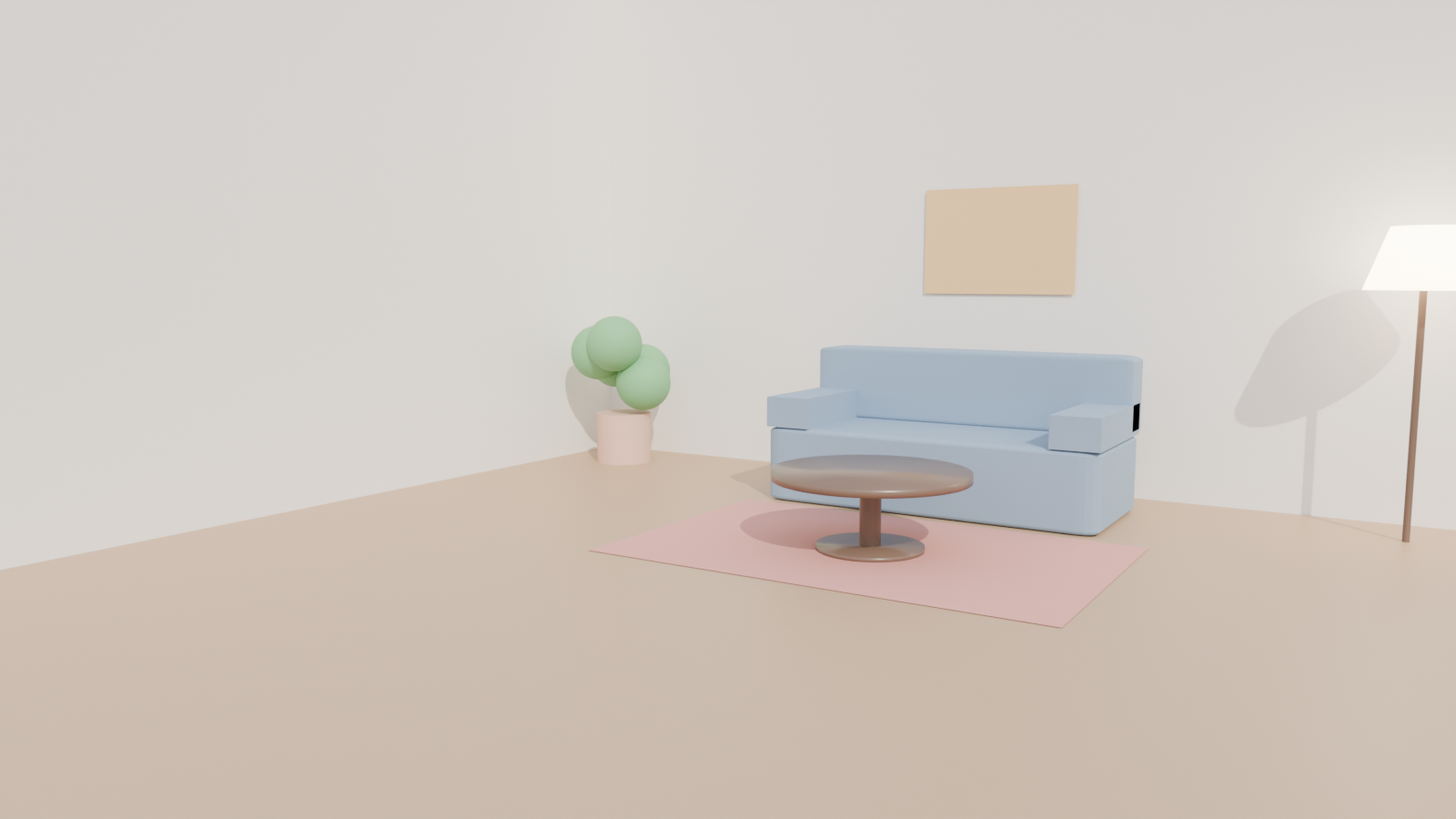
Cycles1600 × 900サンプル 128PNG
本番の GPU で描いた本物の結果と、そのまま動く bpy スクリプト、設定、GPU 秒。スクリプトの URL を scene_url に渡せば同じものが出ます。本番の GPU で 5.4 GPU 秒、0.1 円/GPU 秒で 0.5 円。
写っているもの
ソファ・低いテーブル・ラグ・ランプ・壁の絵。どれも立方体と円柱から。仕上げのパースではなく配置の検討で、部屋を一文で伝えたときにエージェントが作るのはまさにこれです。
シーンの組み方
光は 2 つ。overcast のプリセットがワールドを柔らかい空に置き換え、スクリプトのサンランプが家具を床に落ち着かせる硬い影を付けます。
自分用に変える
家具を動かす・色を変える・別の壁に窓を開ける、と AI に頼み、変えるたびに試し描きします。試し描きは 720p までの 1〜4 コマで、数 GPU 秒です。
0.5 円 でこの 1 枚。新しい鍵の無料のようこそクレジットなら、カード無しで約 184 回分。
この作例を自分の AI で描く
ChatGPT · Claude · Grok · Perplexity
JANCTION Render(MCP サーバー https://render.janction.jp/mcp)で、この作例を描いて: render_preview(scene_url="https://render.janction.jp/samples/ex04_interior_room.py")。そのあと、私の題材に合わせて色・形・カメラを変える案を出して。仕上げの前に確認して。
リンクを押すと、下の文が入った状態でそのアプリが開きます(入らないときは写して貼ってください)。そのアプリに JANCTION Render をまだつないでいなければ、先にコネクタとして https://render.janction.jp/mcp を足してください。
Blender の警告
- environment preset 'overcast' replaced the scene's world (HDRI lighting)
スクリプト(bpy、そのまま動く)
ex04_interior_room.py。シーン・カメラ・コマ範囲だけを組み、解像度・サンプル・ノイズ除去・GPU はサービスが決めます。
"""JANCTION Render example 04: a small living room built from primitives, sun through the open side (one still).

Reproduce: render_final(scene_url="https://render.janction.jp/samples/ex04_interior_room.py",
                        width=1600, height=900, samples=128, environment="overcast")
The overcast preset gives the soft ambient light; the sun lamp in the script gives the shadows.
"""
import math

import bpy
from mathutils import Vector

for ob in list(bpy.data.objects):
    bpy.data.objects.remove(ob, do_unlink=True)
scene = bpy.context.scene
scene.frame_start = 1
scene.frame_end = 1


def material(name, color, roughness=0.5, metallic=0.0, **inputs):
    mat = bpy.data.materials.new(name)
    mat.use_nodes = True
    bsdf = mat.node_tree.nodes["Principled BSDF"]
    bsdf.inputs["Base Color"].default_value = (*color, 1.0)
    bsdf.inputs["Roughness"].default_value = roughness
    bsdf.inputs["Metallic"].default_value = metallic
    for key, value in inputs.items():
        bsdf.inputs[key].default_value = value
    return mat


def smooth(ob):
    for p in ob.data.polygons:
        p.use_smooth = True
    return ob


def add(op, name, mat=None, **kw):
    getattr(bpy.ops.mesh, op)(**kw)
    ob = bpy.context.object
    ob.name = name
    if mat is not None:
        ob.data.materials.append(mat)
    return ob


def look_at(ob, target):
    ob.rotation_euler = (Vector(target) - ob.location).to_track_quat("-Z", "Y").to_euler()


def camera(location, target, lens=50.0):
    data = bpy.data.cameras.new("Camera")
    data.lens = lens
    cam = bpy.data.objects.new("Camera", data)
    scene.collection.objects.link(cam)
    cam.location = location
    look_at(cam, target)
    scene.camera = cam
    return cam


def light(name, kind, location, energy, target=None, size=1.0, color=(1.0, 1.0, 1.0)):
    data = bpy.data.lights.new(name, kind)
    data.energy = energy
    data.color = color
    if kind == "AREA":
        data.size = size
    ob = bpy.data.objects.new(name, data)
    scene.collection.objects.link(ob)
    ob.location = location
    if target is not None:
        look_at(ob, target)
    return ob


wall = material("Wall", (0.9, 0.87, 0.82), roughness=0.85)
wood = material("Wood", (0.52, 0.34, 0.2), roughness=0.45)
fabric = material("Fabric", (0.24, 0.34, 0.46), roughness=0.95)
rug = material("Rug", (0.68, 0.3, 0.26), roughness=1.0)
table = material("Table", (0.16, 0.1, 0.07), roughness=0.3)
leaf = material("Leaf", (0.18, 0.45, 0.2), roughness=0.7)
pot = material("Pot", (0.7, 0.45, 0.35), roughness=0.8)
lamp = material("Lamp", (1.0, 0.9, 0.75), roughness=0.5,
                **{"Emission Color": (1.0, 0.85, 0.6, 1.0), "Emission Strength": 12.0})
art = material("Art", (0.85, 0.55, 0.25), roughness=0.9)

add("primitive_plane_add", "Floor", wood, size=7)
back = add("primitive_plane_add", "BackWall", wall, size=7, location=(0, 3.5, 2.1))
back.rotation_euler = (math.pi / 2, 0, 0)
back.scale = (1, 0.6, 1)
left = add("primitive_plane_add", "LeftWall", wall, size=7, location=(-3.5, 0, 2.1))
left.rotation_euler = (math.pi / 2, 0, math.pi / 2)
left.scale = (1, 0.6, 1)

seat = add("primitive_cube_add", "SofaSeat", fabric, size=1, location=(0.0, 2.6, 0.25))
seat.scale = (2.2, 0.95, 0.5)
backrest = add("primitive_cube_add", "SofaBack", fabric, size=1, location=(0.0, 3.0, 0.75))
backrest.scale = (2.2, 0.25, 0.5)
for x in (-0.95, 0.95):
    arm = add("primitive_cube_add", "SofaArm", fabric, size=1, location=(x, 2.6, 0.6))
    arm.scale = (0.3, 0.95, 0.2)
for ob in (seat, backrest):
    m = ob.modifiers.new("Bevel", "BEVEL")
    m.width = 0.06
    m.segments = 4
carpet = add("primitive_plane_add", "Rug", rug, size=1, location=(0.1, 1.2, 0.004))
carpet.scale = (2.6, 1.7, 1)
top = add("primitive_cylinder_add", "TableTop", table, radius=0.55, depth=0.05, vertices=96, location=(0.1, 1.2, 0.42))
smooth(top)
add("primitive_cylinder_add", "TableLeg", table, radius=0.06, depth=0.4, vertices=32, location=(0.1, 1.2, 0.2))
foot = add("primitive_cylinder_add", "TableFoot", table, radius=0.3, depth=0.03, vertices=64, location=(0.1, 1.2, 0.015))
smooth(foot)
add("primitive_cylinder_add", "Pot", pot, radius=0.22, depth=0.4, vertices=48, location=(-2.9, 2.9, 0.2))
for i in range(5):
    a = i * 2 * math.pi / 5
    puff = add("primitive_uv_sphere_add", "Leaf", leaf, radius=0.22, segments=32, ring_count=16,
               location=(-2.9 + 0.2 * math.cos(a), 2.9 + 0.2 * math.sin(a), 0.65 + 0.08 * i))
    smooth(puff)
add("primitive_cylinder_add", "LampPole", table, radius=0.02, depth=1.5, vertices=24, location=(2.6, 3.0, 0.75))
shade = add("primitive_cone_add", "LampShade", lamp, vertices=48, radius1=0.3, radius2=0.18, depth=0.35,
            location=(2.6, 3.0, 1.6))
smooth(shade)
picture = add("primitive_plane_add", "Picture", art, size=1, location=(0.0, 3.48, 1.75))
picture.rotation_euler = (math.pi / 2, 0, 0)
picture.scale = (1.1, 0.75, 1)

light("Sun", "SUN", (4.0, -3.0, 5.0), 4.0, target=(-1.0, 1.5, 0.0), color=(1.0, 0.95, 0.85))
camera((2.7, -4.4, 1.5), (-0.7, 1.0, 0.75), lens=28)