Updated 2026-10-01
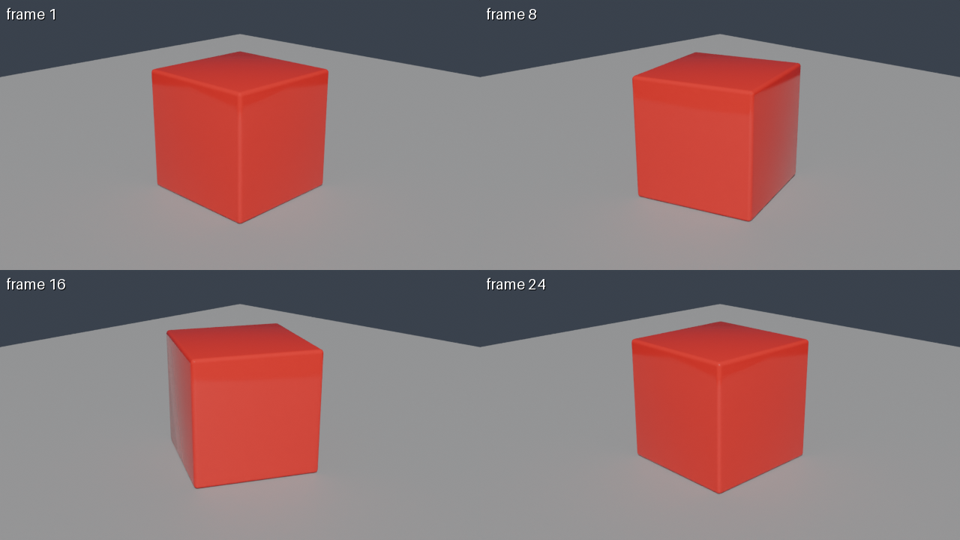
Install the CLI with pip install janction-render and run janction-render preview scene.blend to get a 4-frame preview sheet in a few seconds, then janction-render render scene.blend --frames 1-24 --size 1280x720 --samples 64 --wait for the MP4 (measured: 24 frames at 720p / 64 samples took 59 GPU seconds, 65 seconds round trip). Textures referenced with relative paths are collected automatically; packed images travel inside the file. The free beta gives 10 GPU-minutes per key per day, up to 240 frames and 1080p per job; files are deleted 24 hours after last use. The same works from Claude, ChatGPT, Codex or Claude Code through the MCP server, or from inside Blender with the add-on.
pip install janction-render
janction-render preview scene.blend                                   # 4 frames tiled, a few GPU seconds
janction-render preview scene.blend --frames 1-240 --environment studio
janction-render render scene.blend --frames 1-24 --size 1280x720 --samples 64 --wait   # output.mp4
janction-render render scene.blend --frames 1-48 --size 1920x1080 --samples 128 --output png --wait
A free key is created on first use and cached in ~/.janction-render.json. pip install janction-render[blend] adds blender-asset-tracer, which collects the textures a .blend references through relative paths; packed images need nothing.
Connect the MCP server (https://render.janction.jp/mcp, see below) and say: "Render my scene.blend: preview first, then 24 frames at 720p as an MP4." The agent uploads the file (stdio) or takes an https link (remote), calls render_preview, shows you the sheet, calls render_estimate and then render_final, and gives you the links.
The add-on adds Preview / Estimate / Final buttons under Properties → Render; a copy of the open file and its relative textures are uploaded.
| job | GPU time | note |
|---|---|---|
| preview, 4 frames (720p split in 4 tiles, 16 samples, denoised) | about 4 s | round trip about 8 s; the image comes back inline |
| final, 24 frames at 1280x720, 64 samples → MP4 | about 60 s | measured 2026-09-30 / 10-01 (59 s and 58 s) |
| final, one 1920x1080 frame at 128 samples | about 11 s | the estimator's baseline; heavy scenes take longer |
render_estimate gives the number before rendering; once a scene has been rendered once, the estimate uses that scene's own measurement.
Free beta (as of 2026-10-01): 10 GPU-minutes per key per day (20 per network), final renders up to 240 frames at 1080p. No sign-up: connecting creates a key. Inputs and results are deleted 24 hours after last use and never used for training. Paid plans will be announced on this site and in llms.txt before they start.
| from | how |
|---|---|
| Claude.ai (web / desktop / mobile) | Settings → Connectors → Add custom connector → https://render.janction.jp/mcp. "Connect" opens a page that creates a free key |
| ChatGPT | Settings → Connectors → Advanced → Developer mode → Create → https://render.janction.jp/mcp (OAuth) |
| Claude Code | claude mcp add --transport http janction-render https://render.janction.jp/mcp, then /mcp to authenticate |
| Codex | codex mcp add janction-render --url https://render.janction.jp/mcp |
| Cursor / VS Code | Add to Cursor Add to VS Code The button opens the editor; confirm and it is added. Manual: Streamable HTTP at https://render.janction.jp/mcp |
| Other MCP clients | Streamable HTTP at https://render.janction.jp/mcp; OAuth or Authorization: Bearer <api key> |
| Terminal (stdio, sends local files) | claude mcp add janction-render -e JANCTION_RENDER_SERVER=https://render.janction.jp -- uvx --from janction-render janction-render-mcp |
| Inside Blender (for people) | The add-on; extension repository https://render.janction.jp/extensions/index.json. Maya / Houdini / Cinema 4D: submit tools |
Relative paths inside the .blend folder are collected by the CLI (with janction-render[blend]) and by the add-on; packed images travel inside the file. Absolute paths and image sequences are not sent; pack them or make them relative.
5.0 by default, 5.2 with blender='5.2' (the add-on picks the one matching yours). A file saved by a newer Blender may need 5.2.
Measured: 24 frames at 1280x720 with 64 samples took 59 GPU seconds; 48 frames at 1080p with 128 samples took 322 GPU seconds. render_estimate tells you before you start.
During the beta: 10 GPU-minutes per key per day, no sign-up. Paid plans per GPU second will be announced before they start.
JANCTION Render v0.4.8 · JasmyLab Inc. · 日本語