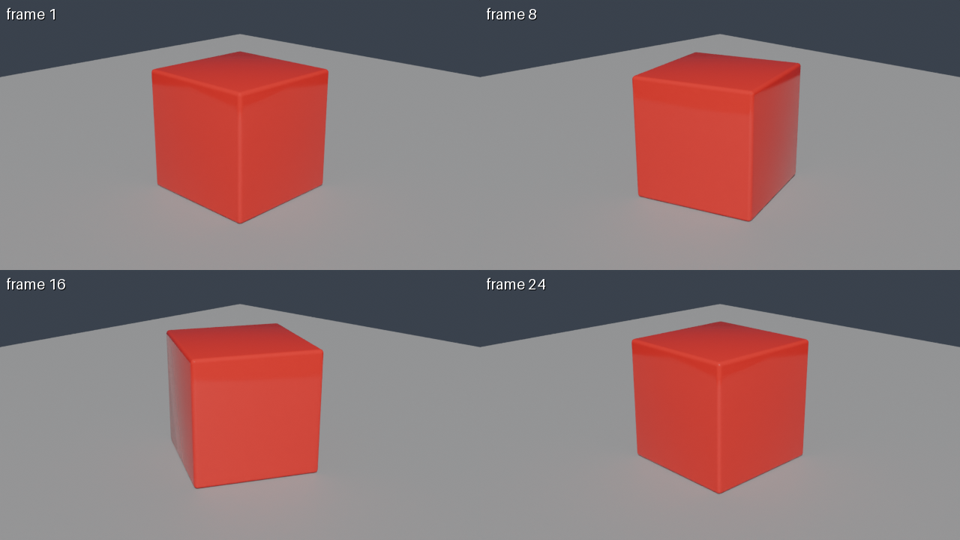
JANCTION Render is a cloud GPU render farm for Blender that AI agents and people use as an MCP server, an HTTP API or in the browser. Send a .blend, a bpy script or a 3D file, get a preview in seconds, and receive the final frames or an MP4. AI agents connect at https://render.janction.jp/mcp.
No high-end GPU? Turn your 3D into images and video.
A Blender file or a scene an AI wrote: preview, fix and finish it on cloud GPUs. A 100 JPY welcome credit for a new key (14 days, no card; one per network every 30 days, further keys on the same network share what is left), and 400 JPY more for saving a card that is not charged (once per card); after that, previews stay free up to 2 GPU-minutes a day and finals cost 0.1 JPY per GPU-second.
Try your own file for freeBuild it with an AI and trySee finished examples
Start from your problem: what is really free · render without a GPU · cloud rendering, step by step
Working from Claude, ChatGPT, Claude Code or Codex instead? Connect, then try: "Using JANCTION Render, build a glossy red cube rotating on a grey floor and show me a 4-frame preview. If it looks right, render 24 frames at 1280x720 as an MP4."
JANCTION Render is a cloud GPU render farm for Blender that AI agents call as an MCP server or HTTP API. Send a .blend file, a bpy script or a 3D file (glTF / FBX / USD), preview in seconds, and get frames or an MP4 back from JANCTION NVIDIA GPUs. Every preview also returns a verdict on what is wrong, such as too dark, blown out, no light or an object out of frame, and the bpy code to fix it, so the agent can correct the scene before the final render. No local Blender or GPU is needed. Works from Claude, ChatGPT, Claude Code, Codex, Cursor or any MCP client. Inputs and results are deleted 24 hours after last use (normally 7 days for keys that have paid 500 JPY or more in total) and are never used for training.
An execution layer for agent-authored scenes and existing .blend files: edit in your agent or local Blender, then send the scene to cloud GPUs for rendering.
Blender render farm for AI agents · Blender cloud rendering without a GPU · How to render Blender without a GPU · Cycles is slow on my MacBook: what to do · Free Blender cloud rendering, compared · MCP server for Blender rendering · Claude + Blender · ChatGPT + Blender · Claude Code + Blender · Codex + Blender · Run a bpy script on a cloud GPU · Blender rendering API · Render farm APIs compared · Fix Blender render errors · FAQ · Blender MCP servers compared · Best render farms for AI agents · Colab vs JANCTION Render · Render a .blend online · Animation to MP4 online · JANCTION vs SheepIt · JANCTION vs BlendSwap · Render glTF / FBX / USD online · Cursor + Blender · VS Code + Blender · Windsurf + Blender · Gemini CLI / Antigravity + Blender · DeepSeek (Harness MCP, API tool calling) + Blender · Agent-generated 3D · Headless Blender (CI / batch) · Product turntable video · Blender add-on · Maya / Houdini / Cinema 4D · What a render costs (measured) · 360-degree product video with AI · Product shots from 4 angles · glTF / FBX to MP4 by API · Headless Blender API: build or call · JANCTION vs RebusFarm / GarageFarm / Fox · For companies and teams · AI-generated 3D model to product shots and a turntable · How to render 3D for free · Blender on an RTX PRO 6000, paid by the second
Track record (last 30 days, external use only): agents connect from ChatGPT, Claude, Notion, Blender add-on and Grok; 97% of renders succeed; median 6 s from submit to result. Status
MCP server URL: https://render.janction.jp/mcp (Streamable HTTP, OAuth with dynamic registration, or a Bearer API key)
| from | how |
|---|---|
| Claude.ai (web / desktop / mobile) | Settings → Connectors → Add custom connector → paste the URL. "Connect" opens a page that creates a free key |
| ChatGPT | Settings → Connectors → Advanced → Developer mode → Create → paste the URL (OAuth) |
| Claude Code | claude mcp add --transport http janction-render https://render.janction.jp/mcp, then /mcp to authenticate |
| Codex | codex mcp add janction-render --url https://render.janction.jp/mcp (CLI and IDE extension share it) |
| Cursor / VS Code | Add to Cursor Add to VS Code The button opens the editor; confirm and it is added (OAuth creates a free key). Manual: Streamable HTTP at the URL above |
| Antigravity CLI / Gemini CLI | agy plugin install https://github.com/JasmyLab-JANCTION/janction-render (Antigravity CLI) or gemini extensions install https://github.com/JasmyLab-JANCTION/janction-render (Gemini CLI); both add the MCP server and the workflow skill |
| DeepSeek Harness (dsh) | One @deepseek-ai/dsh-mcp-client entry with transport: streamable-http, the URL above and an Authorization: Bearer header holding a key from POST /v1/keys. DeepSeek guide |
| Grok (grok.com) | Connectors → New Connector → Custom → paste the URL |
| Perplexity (Pro / Max / Enterprise) | Connectors → add a custom remote connector with the URL |
| Le Chat (Mistral, workspace admin) | Connectors → add a custom MCP connector with the URL |
| Notion (Notion Agent, Business / Enterprise) | Settings → Connections → Discover → Add Custom MCP → paste the URL, then sign in (OAuth). The button shows only when a workspace admin allows custom MCP servers; a Custom Agent connects it in that agent's own settings |
| Windsurf, Cline, Goose, other MCP clients | Streamable HTTP at the URL above (Windsurf: serverUrl; Cline: streamableHttp); OAuth, or Authorization: Bearer <api key>. Installer notes: llms-install.md |
| Terminal (stdio, sends local files) | claude mcp add janction-render -e JANCTION_RENDER_SERVER=https://render.janction.jp -- uvx --from janction-render janction-render-mcp |
| Inside Blender | The add-on: Preferences → Get Extensions → Repositories → add https://render.janction.jp/extensions/index.json → Install. Preview, estimate and final render from the Render properties |
| Maya / Houdini / Cinema 4D | Submit tools: export to USD / FBX / Alembic, render with Cycles (integrations/ on GitHub) |
Codex: put the stdio command in ~/.codex/config.toml (see the README on GitHub).
A temporary API key is issued automatically; set JANCTION_RENDER_API_KEY to keep one (quota belongs to the key).
| tool | what |
|---|---|
| scene_info | read the scene without rendering: cameras, frame range, resolution, missing files |
| render_preview | fast preview, 1-4 frames tiled in one image (720p budget), returned inline |
| render_estimate | how long it will take ("about 3 minutes") and whether it fits the free time left, before rendering |
| render_final | final frames (PNG / EXR) or a video (MP4 / WebM / ProRes), rendered in chunks, with a time estimate |
| render_status / render_download / render_cancel | progress and remaining time, files (remote: links valid ~24h; only='mp4' for just the video), cancel |
| billing / render_info | free GPU time left today and credit; workers online, supported inputs and environment presets |
| render_share / render_unshare | turn a finished render into a public page (/r/<id>) or take it down; listed=true asks for the gallery (shown after the operator's review) |
| asset_search | find CC0 models, textures and HDRIs on Poly Haven by name; 'polyhaven:<id>' in asset_urls fetches them |
A .blend (send textures along or pack them), a bpy Python script (no local Blender needed), or a 3D file (glTF/GLB, FBX, USD, OBJ, STL, PLY, Alembic, imported into an empty scene).
Images and other assets travel with the scene (assets / asset_urls). Blender 3.6 / 4.2 / 4.5 / 5.0 / 5.2 (Cycles by default, engine='eevee' for EEVEE; both on GPU); environment presets night, overcast, studio, sunset (HDRI lighting). A scene without a camera or light gets an automatic one.
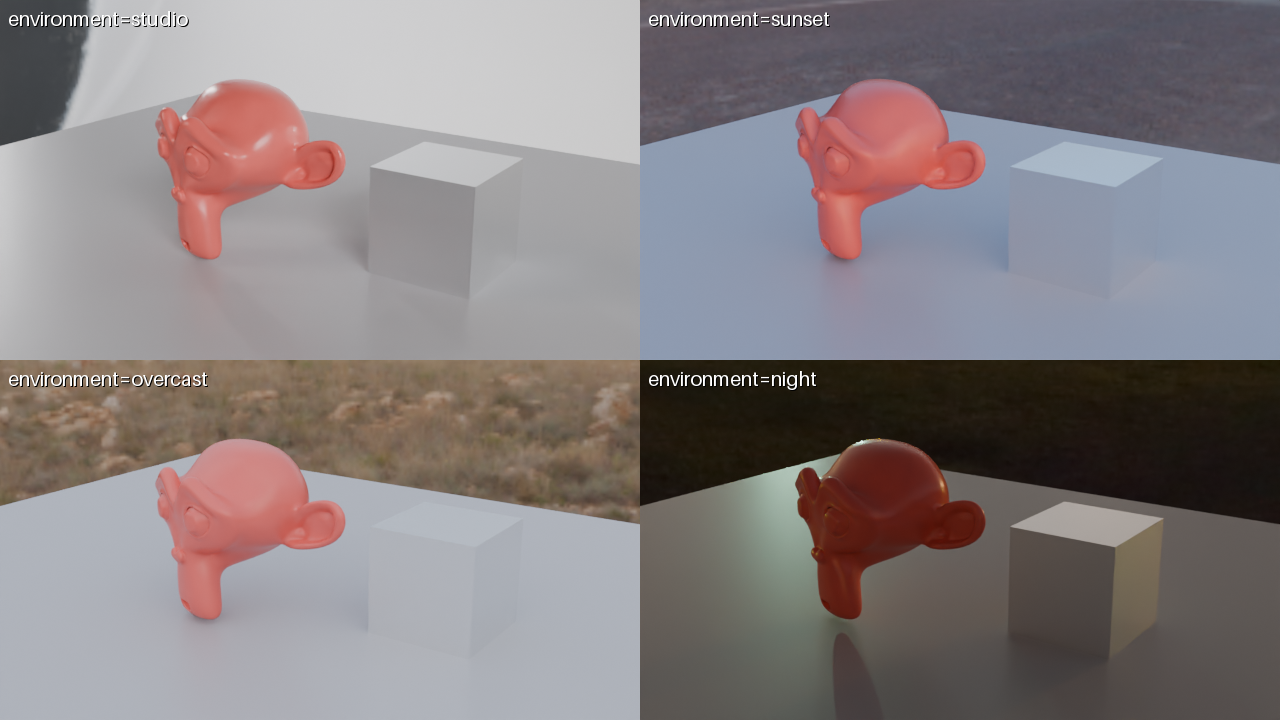
environment="compare" returns exactly this: the same frame under all four, labelled, so the agent can ask which one you want.A bpy script is the most reliable input; a .blend opens with the Blender it was saved in (5.0 or 5.2); scripts and 3D files use 5.0, and blender='5.2' switches them to 5.2.
Free to start: each new key gets a 100 JPY welcome credit (1000 GPU-seconds, 14 days, no card) for previews and finals; one full credit per network every 30 days (further keys from the same network use what is left of that network's credit; several people on one network, such as a school or an office, can write to [email protected] with the key prefix and we re-evaluate by hand). Saving a card on a page that charges nothing adds 400 JPY more, once per card. After it is used up or expires, previews are free up to 2 GPU-minutes per key per day (reset at 00:00 UTC) and final renders cost GPU seconds used x 0.1 JPY from prepaid credit, reserved up to the estimate and charged only for what actually rendered. Top-ups (paid) start at 500 JPY. The first top-up during the 14-day welcome period counts 1.5x, with the bonus capped at 500 JPY (500 JPY buys 750 JPY of credit). Top-ups of 2,000 JPY or more get 10 to 20% extra (not combined with the first-top-up bonus; the larger one applies). Top-up bonuses are separate from the welcome credit and the card-saving credit. Top-ups are paid at a Stripe Checkout page; the rest stays as credit. GPUs available right now: 2 (from /v1/health). The number updates itself when GPUs are added.
POST /v1/try    JSON {scene_script | scene_url}   first 720p preview without a key + a key to continue, in one response (1 per network per day)
POST /v1/keys                      temporary key (no sign-up)
POST /v1/files  (multipart file)    .blend / .py / .glb ...  -> scene_id
POST /v1/files/{id}/assets         assets (textures, glTF .bin)
POST /v1/estimate {kind, frames..}  time estimate, quota check (no render)
POST /v1/jobs   {scene_id, kind: info|preview|final, environment?, blender?, ...}   (Idempotency-Key header makes retries safe)
POST /v1/outcomes/turntable | product-shot   fixed-price outcomes: price_yen quoted first and never exceeded (GET /v1/outcomes)
POST /v1/me/limits {job_yen, day_yen}   spending caps per key; over-cap jobs are refused (403) before anything is reserved
GET  /v1/jobs/{id}                 status, eta, artifacts, cost
GET  /v1/jobs/{id}/artifacts/{name}
POST /mcp                           remote MCP (Streamable HTTP)
Benchmarks (measured GPU seconds) · OpenAPI · Status · llms.txt (the guide agents read first) · llms-full.txt · FAQ · Security · GitHub
JANCTION Render v0.4.147 · JasmyLab Inc. · Updated 2026-10-14 · Tested with Blender 3.6 / 4.2 / 4.5 / 5.0 / 5.2, JANCTION Render 0.4.147 · 日本語