Vol. 1 · No. 257Blender 3.6 / 4.2 / 4.5 / 5.0 / 5.2Cycles · EEVEE
JANCTION
Render · Blender on RTX PRO 6000 · Tokyo
0.1 JPYper GPU-secondFirst 100 JPYfree, no card

JANCTION Render — Blender GPU Rendering for AI Agents

No high-end GPU? Turn your 3D into images and video.

A Blender file or a scene an AI wrote: preview, fix and finish it on cloud GPUs. No sign-up, free to start.

JANCTION Render is a cloud GPU render farm for Blender that AI agents call as an MCP server or HTTP API. Send a .blend file, a bpy script or a 3D file (glTF / FBX / USD), preview in seconds, and get frames or an MP4 back from JANCTION's NVIDIA GPUs. Every preview also returns a verdict on what is wrong, such as too dark, blown out, no light or an object out of frame, and the bpy code to fix it, so the agent can correct the scene before the final render. No local Blender or GPU is needed. AI agents connect at https://render.janction.jp/mcp.

Blender
3.6 · 4.2 · 4.5 · 5.0 · 5.2
Cycles · EEVEE
GPU
NVIDIA RTX PRO 6000
Blackwell Max-Q, 96 GB
Free credit
100 JPY, no card
up to 500 JPY per key
Japan
Datacenter in Tokyo
JasmyLab Inc. · JPY
● Upload & render · Tokyo · RTX PRO 6000No sign-up · first preview free

Drop your Blender file, 3D model or bpy script

Your 3D model or Blender file, rendered on a cloud GPU. The first preview needs no payment.

No sign-upFirst 100 JPY with no cardNo GPU or Blender needed.blend .glb .gltf .fbx .usd .usdz .obj .stl …, bpyPreview in secondsThen 0.1 JPY per GPU-second, priced before it runsUse it from your AI (Claude, ChatGPT, Codex)

1. Your file

A small Blender scene from this service renders in a few seconds; then try your own file below.

or

Paste a bpy script instead

No connector in your AI? Ask it: "Write a Blender 5.0 bpy script that builds <your scene> with a camera and a light; do not call render. Reply with the code only." Then paste the code here.

.blend · .glb · .gltf · .fbx · .usd · .obj · .stl · .pyBlender 3.6 / 4.2 / 4.5 / 5.0 / 5.2Cycles · EEVEEThen 0.1 JPY / GPU-second

A 100 JPY welcome credit for a new key (14 days, no card; one per network every 30 days, further keys on the same network share what is left), and 400 JPY more for saving a card that is not charged (once per card); after that, previews stay free up to 2 GPU-minutes a day and finals cost 0.1 JPY per GPU-second.

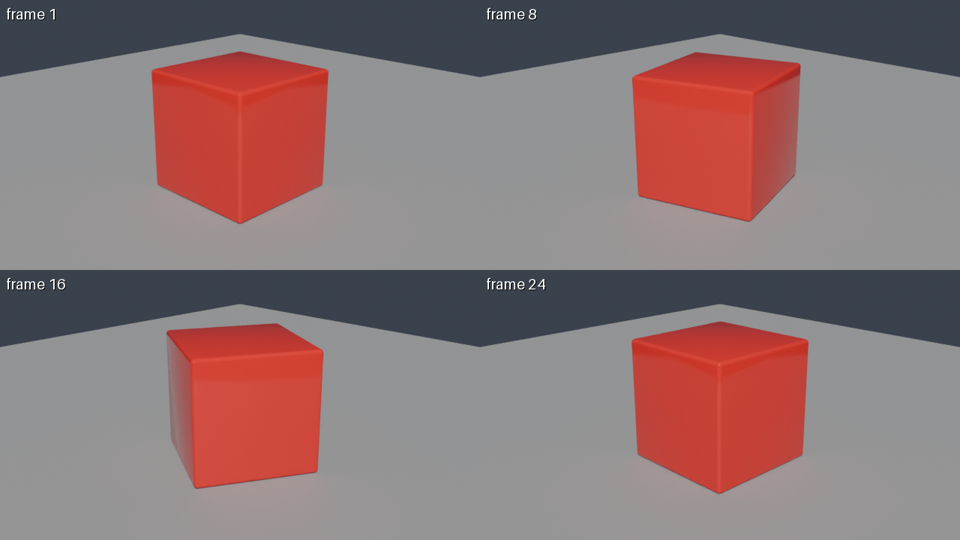
From an AI app: connect https://render.janction.jp/mcp and say: “Using JANCTION Render, build a glossy red cube rotating on a gray floor and show me a 4-frame preview. If it looks right, render 24 frames at 1280x720 as an MP4.”

Start from your problem: what is really free · render without a GPU · cloud rendering, step by step


Try your own file

Drop a .blend, a GLB / FBX / USD or a bpy script into the browser. No sign-up; the first preview needs no payment.

Try your own file for free ↑

Render from your AI

Add the MCP URL to ChatGPT, Claude, Codex or Cursor. Your AI writes the scene and renders it here.

How to connect ↓

Try the sample

No file yet? A small scene from this service renders in a few seconds; then try your own.

Render the sample

On the wire

Live usage of render.janction.jp · external use only

Updated · source /v1/stats, refreshed every 5 minutes

1,779renders since launch (2026-09-30)
2,708GPU-minutes rendered since launch
413renders sent from AI apps over MCP · 30 days
99%of renders succeed · 7 days

By window

RendersFrom AI appsSuccessGPU-minMedian round trip
24 hours492100%336 s
7 days44610099%35510 s
30 days1,73841398%2,6797 s

Which AI apps · 30 days

  • Claude124
  • ChatGPT107
  • Cursor102
  • Codex26
  • Notion24
  • Sesame17
  • DeepSeek Harness13

Completed renders grouped by the AI app that submitted them over MCP. The plain HTTP API and the CLI are counted in the totals but not here. The operator's own tests, benchmarks, monitoring and testers' keys are excluded. Success counts failures on JANCTION's side; failures caused by what was sent, such as an error in the script, are left out.

Track record (last 30 days, external use only): agents connect from Claude, ChatGPT, Cursor, Codex and Notion; 98% of renders succeed; median 7 s from submit to result. 1,779 renders since launch. Status

Straight from the scene

What JANCTION Render is

JANCTION Render is a cloud GPU render farm for Blender that AI agents call as an MCP server or HTTP API. Send a .blend file, a bpy script or a 3D file (glTF / FBX / USD), preview in seconds, and get frames or an MP4 back from JANCTION's NVIDIA GPUs. Every preview also returns a verdict on what is wrong, such as too dark, blown out, no light or an object out of frame, and the bpy code to fix it, so the agent can correct the scene before the final render. No local Blender or GPU is needed.

From an AI app, connect the MCP URL and say:

“Using JANCTION Render, build a glossy red cube rotating on a gray floor and show me a 4-frame preview. If it looks right, render 24 frames at 1280x720 as an MP4.”

Start from your problem: what is really free · render without a GPU · cloud rendering, step by step.

Six material balls: glass to car paint
Fig. — Glass, gold, skin, emission, car paint and plastic. Each one is a Principled BSDF with a few inputs changed. Case No. 5

How it works

Send · preview · estimate · final

Send

A .blend (textures alongside), a bpy script, or a 3D file (glTF / GLB, FBX, USD, OBJ, STL, PLY, Alembic). Blender 3.6 / 4.2 / 4.5 / 5.0 / 5.2, Cycles or EEVEE. A missing camera or light is added for you

Preview

1 to 4 frames tiled in one image in a few GPU seconds (up to 1280x720), with a verdict (too dark, blown out, no light, object out of frame) and the bpy code that fixes it. Lighting presets night / overcast / studio / sunset (environment="compare" shows all four)

A 4-frame preview rendered by JANCTION Render
The 4-frame preview Claude.ai got from that prompt: 4 GPU seconds. The 24-frame 720p MP4 took 58 GPU seconds. Both fit in what a new key gets for free.

Estimate

GPU seconds, wall time and the price before anything runs. A paid final waits for approval. Spending caps per key and per job

Final

PNG / EXR frames or MP4 / WebM / ProRes / GIF / WebP. Up to 3,000 frames per instruction (run as parts under one job id), 1080p on free time, 4K on prepaid credit. A finished render can become a public share page (/r/<id>)

Blender 3.6, 4.2 and 4.5 are there too: pass blender='4.5' (or '4.2', '3.6'), and a script that stops on Blender 5 because it uses an older API is rendered again on 4.5, 4.2 or 3.6 automatically.

The Render Journal

Real renders on the production GPU · 25 cases and counting

All cases →

When to use it

  • an AI coding agent built a Blender scene and needs the final image or video
  • a .blend or bpy animation needs GPU rendering and an MP4
  • a model exported as glTF / FBX / USD / OBJ should be rendered with Cycles without opening Blender
  • a pipeline needs a Blender rendering API instead of a render farm web form

Built so an agent can pay safely

  • the price of a final comes back before it runs; a paid one waits for the user's approval
  • POST /v1/me/limits sets a per-job and per-day cap for the key; a job over the cap is refused (403) before anything is reserved
  • Idempotency-Key makes a retried request render once; Retry-After says when to come back
  • fixed-price outcomes (/v1/outcomes turntable / product-shot) never charge more than the quoted price_yen

Connect from your AI

MCP URL: https://render.janction.jp/mcp

fromhow
Claude.aiSettings → Connectors → Add custom connector → the URL above. "Connect" opens a page that creates a free key
ChatGPTPlugins → Add → Create plugin → the URL above. A .blend attached to the chat reaches the tools
Claude Codeclaude mcp add --transport http janction-render https://render.janction.jp/mcp
Codexcodex mcp add janction-render --url https://render.janction.jp/mcp
Cursor / VS CodeAdd to Cursor Add to VS Code
The button opens the editor; confirm and it is added. By hand: Streamable HTTP at the URL above
Terminal AIsGemini CLI / Antigravity · Kimi Code · Qwen Code · OpenCode · GitHub Copilot CLI · DeepSeek Harness (dsh-mcp-client). One line each (a plugin or mcp add); OAuth issues a free key
Grok · Perplexity · Le Chat · NotionConnectors (plugins) → custom MCP → the URL above. In Grok, send a local file through an /upload link
Windsurf · Cline · Goose · othersStreamable HTTP at the URL above. OAuth, or Authorization: Bearer <API key>. llms-install.md
Local files as they areclaude mcp add janction-render -e JANCTION_RENDER_SERVER=https://render.janction.jp -- uvx --from janction-render janction-render-mcp (stdio; sends a large .blend in parts), or uvx janction-render preview <file>
Blender · Maya · Houdini · Cinema 4DBlender add-on (preview, estimate and final from the Render properties panel), Maya / Houdini / C4D submitters
Plain HTTPcurl -X POST https://render.janction.jp/v1/keys for a key (no sign-up) → OpenAPI

Every app, step by step · Package: PyPI · Code: GitHub

Tools (13)

toolwhat it does
scene_inforead without rendering: cameras, frame range, resolution, missing files
render_previewfast 1 to 4 frame preview (up to 720p); returns the image, a verdict and fix code
render_estimateminutes and JPY before rendering, and whether it fits the free time
render_finalfinal render (PNG / EXR frames, or MP4 / WebM / ProRes video), frames rendered in parts
render_status / render_download / render_cancelstatus and eta, download (links valid 24 h, only='mp4' for the video alone), cancel
billing / render_infobalance and free time left, worker availability, accepted formats and presets
render_share / render_unsharemake a finished render a public page (/r/<id>) or take it down; listed=true asks for the gallery
asset_searchsearch Poly Haven (CC0) models, textures and HDRIs by name; put 'polyhaven:<id>' in asset_urls
render_import_filetake a file attached to the chat (.blend, glTF, FBX, USD, OBJ, STL, .py) and make it a scene_id (apps where attachments reach tools, such as ChatGPT)

What one key can do

free keykey that has paid 500 JPY or more
Previewswithin the welcome credit, then free up to 2 GPU-minutes a daysame
Finalsup to 1080p, within the welcome creditup to 4K, 0.1 JPY per GPU-second (10 GPU-hours per job)
.blend sizeup to 1 GB (other 3D files and scripts 512 MB)up to 5 GB
Kept24 hours after last usenormally 7 days

Never used for training. Download links last 24 hours and are renewed on request while the files are kept.

What your yen renders

0.1 JPY per GPU-second (6 JPY per GPU-minute) · measured on the production GPU

You payfree
Credit500 JPY
GPU time1.4 GPU-hours
Measured jobGPU sPriceHow many
4-frame preview, 720p4.0 s0.4 JPY≈ 1,250
1080p still, 128 samples (six material balls)7.0 s0.7 JPY≈ 714
24-frame 720p turntable MP458.3 s5.8 JPY≈ 85
5-second 720p animation, 120 frames138.2 s13.8 JPY≈ 36
1440² glass product still, 128 samples166.5 s16.7 JPY≈ 30

Counts are credit ÷ the measured price of each job on the production GPU. Your own scene may take more or less; render_estimate quotes it before anything runs. After the welcome credit, previews stay free up to 2 GPU-minutes a day (about 30 four-frame previews).

Credit goes to this browser's key. For the key your AI app uses, pay from the link the AI gives you.

Three products, one key

Callable from MCP or HTTP

ProductMetered

Render API

A .blend, a bpy script or a 3D file in; frames (PNG / EXR) or a video (MP4 / WebM / ProRes) out. Preview first, estimate, then the final.

metered: 0.1 JPY per GPU-second; a new key's welcome credit of up to 500 JPY covers the first renders. A 24-frame 720p MP4 is about 6 JPY.

ProductFixed ceiling

3D Preview API

A GLB / FBX / USD / OBJ (for example an AI-generated asset) in; four stills at 0 / 90 / 180 / 270 degrees out, studio lighting, optional transparent background. Thumbnails and QA.

fixed ceiling: 6 JPY per asset at 1080p or square (0 while the free time covers it).

ProductFixed ceiling

Product Turntable API

The same 3D file in; one full rotation as an MP4 (24 fps, 24 / 48 / 96 frames, 720p or 1080p) out. Product pages and portfolios.

fixed ceiling: 9 to 59 JPY per video depending on size and frames (0 while the free time covers it).

API

POST /v1/try    JSON {scene_script | scene_url}   first 720p preview without a key + a key to continue, in one response (1 per network per day)
POST /v1/keys                      temporary key (no sign-up)
POST /v1/files  (multipart file)    .blend / .py / .glb ...  -> scene_id
POST /v1/files/{id}/assets         assets (textures, glTF .bin)
POST /v1/estimate {kind, frames..}  time estimate, quota check (no render)
POST /v1/jobs   {scene_id, kind: info|preview|final, environment?, blender?, ...}   (Idempotency-Key header makes retries safe)
POST /v1/outcomes/turntable | product-shot   fixed-price outcomes: price_yen quoted first and never exceeded (GET /v1/outcomes)
POST /v1/me/limits {job_yen, day_yen}   spending caps per key; over-cap jobs are refused (403) before anything is reserved
GET  /v1/jobs/{id}                 status, eta, artifacts, cost
GET  /v1/jobs/{id}/artifacts/{name}
POST /mcp                           remote MCP (Streamable HTTP)

Benchmarks (measured GPU seconds) · OpenAPI · Status · llms.txt (the guide agents read first) · llms-full.txt · Security · FAQ · GitHub

Guides

Classified by what you are trying to do

Getting started

By AI app

3D files and products

Free and cost

API and teams

Compared

Help

Questions

What is JANCTION Render?

A cloud GPU rendering service for Blender whose interfaces are MCP tools, an HTTP API and a command line, so AI agents (Claude, ChatGPT, Claude Code, Codex, Cursor) and pipelines can render without a local GPU.

Is JANCTION Render the same as Smart Render by JANCTION?

No. Smart Render (SmartRender) is a separate service from the same operator, JasmyLab Inc.: a browser upload service that renders .blend files on distributed GPUs, in development. JANCTION Render is the MCP server and HTTP API for AI agents and is live, with a welcome credit of up to 500 JPY per new key. Numbers, partners and dates published about one do not describe the other; the fact sheet at /facts is the primary source for JANCTION Render.

Which agents and apps can use it?

Claude.ai, ChatGPT, Claude Code, Codex, Cursor and any MCP client; curl or any HTTP library; the Python package janction-render.

What can I send?

A .blend (with its textures as assets or packed), a bpy Python script, or a 3D file (glTF/GLB, FBX, USD, OBJ, STL, PLY, Alembic) that is imported into an empty scene.

Which Blender version?

Blender 5.0 or 5.2, with Cycles on NVIDIA GPUs. A .blend opens with the version it was saved in; bpy scripts and 3D files use 5.0 unless you pass blender='5.2'. render_info lists what is available. Blender 3.6, 4.2 and 4.5 are there too: pass blender='4.5' (or '4.2', '3.6'), and a script that stops on Blender 5 because it uses an older API is rendered again on 4.5, 4.2 or 3.6 automatically.

Will it look the same as in my Blender?

Mostly. The scene's own color management (view transform such as AgX or Filmic, look, exposure), cameras, lights and materials are kept as they are. What the service sets: resolution and samples (previews up to 32 samples, finals 128 by default), denoising on by default (denoise=false turns it off), Cycles on an NVIDIA GPU unless you pass engine='eevee', and the Blender version (a .blend opens with the version it was saved in, 5.0 or 5.2; scripts and 3D files use 5.0 unless you pass blender='5.2'). So a .blend saved in another version, a different sample count, denoising and GPU instead of CPU can change noise and fine detail; an environment preset replaces the world only when you pass one.

No high-end GPU? Turn your 3D into images and video.

A Blender file or a scene an AI wrote: preview, fix and finish it on cloud GPUs.